
Basic Nipype#
Author: Steffen Bollmann
Date: 17 Oct 2024
Citation and Resources:#
Dataset from OSF#
Shaw, T., & Bollmann, S. (2020). Dataset for Towards Optimising MRI Methods for ChAracterisation of Tissue (TOMCAT) [Data set]. OSF. https://doi.org/10.17605/OSF.IO/BT4EZ
Tools included in this workflow#
Nipype:
Esteban, O., Markiewicz, C. J., Burns, C., Goncalves, M., Jarecka, D., Ziegler, E., Berleant, S., Ellis, D. G., Pinsard, B., Madison, C., Waskom, M., Notter, M. P., Clark, D., Manhães-Savio, A., Clark, D., Jordan, K., Dayan, M., Halchenko, Y. O., Loney, F., … Ghosh, S. (2025). nipy/nipype: 1.8.6 (1.8.6). Zenodo. https://doi.org/10.5281/zenodo.15054147
FSL:
M. Jenkinson, C.F. Beckmann, T.E. Behrens, M.W. Woolrich, S.M. Smith. FSL. NeuroImage, 62:782-90, 2012
Smith S. M. (2002). Fast robust automated brain extraction. Human brain mapping, 17(3), 143–155. https://doi.org/10.1002/hbm.10062
AFNI:
Cox RW (1996). AFNI: software for analysis and visualization of functional magnetic resonance neuroimages. Comput Biomed Res 29(3):162-173. doi:10.1006/cbmr.1996.0014 https://pubmed.ncbi.nlm.nih.gov/8812068/
RW Cox, JS Hyde (1997). Software tools for analysis and visualization of FMRI Data. NMR in Biomedicine, 10: 171-178. https://pubmed.ncbi.nlm.nih.gov/9430344/
SPM12:
Friston, K. J. (2007). Statistical parametric mapping: The analysis of functional brain images (1st ed). Elsevier / Academic Press.
Demonstrating the module system in Python and Nipype#
# we can use module to load fsl in a specific version
import module
await module.load('fsl/6.0.4')
await module.list()
Lmod Warning: MODULEPATH is undefined.


Lmod has detected the following error: The following module(s) are unknown:
"fsl/6.0.4"

Please check the spelling or version number. Also try "module spider ..."
It is also possible your cache file is out-of-date; it may help to try:
  $ module --ignore_cache load "fsl/6.0.4"

Also make sure that all modulefiles written in TCL start with the string
#%Module
[]
!bet
/bin/bash: line 1: bet: command not found
Load AFNI and SPM as well#
await module.load('afni/22.3.06')
await module.load('spm12/r7771')
await module.list()
Lmod Warning: MODULEPATH is undefined.


Lmod has detected the following error: The following module(s) are unknown:
"afni/22.3.06"

Please check the spelling or version number. Also try "module spider ..."
It is also possible your cache file is out-of-date; it may help to try:
  $ module --ignore_cache load "afni/22.3.06"

Also make sure that all modulefiles written in TCL start with the string
#%Module
Lmod Warning: MODULEPATH is undefined.


Lmod has detected the following error: The following module(s) are unknown:
"spm12/r7771"

Please check the spelling or version number. Also try "module spider ..."
It is also possible your cache file is out-of-date; it may help to try:
  $ module --ignore_cache load "spm12/r7771"

Also make sure that all modulefiles written in TCL start with the string
#%Module
[]
Download test data#
%%bash
if [ -f ./sub-01_ses-01_7T_T1w_defaced.nii ]; then
    echo "nii Output file exists, not downloading or unpacking again"
else
    if [ ! -f ./sub-01_ses-01_7T_T1w_defaced.nii.gz  ]; then
        echo "nii.gz does not exist. So, it needs to be downloaded."
        osfURL="osfstorage/TOMCAT_DIB/sub-01/ses-01_7T/anat/sub-01_ses-01_7T_T1w_defaced.nii.gz"
        echo "downloading now ..."
        osf -p bt4ez fetch $osfURL ./sub-01_ses-01_7T_T1w_defaced.nii.gz
    fi

    if [  -f ./sub-01_ses-01_7T_T1w_defaced.nii.gz ]; then
        echo "nii.gz exists. So, it needs to be unpacked and deleted"
        echo "unpacking now ..."
        gunzip ./sub-01_ses-01_7T_T1w_defaced.nii.gz
    fi
fi
nii.gz does not exist. So, it needs to be downloaded.
downloading now ...
nii.gz exists. So, it needs to be unpacked and deleted
unpacking now ...
  0%|          | 0.00/72.7M [00:00<?, ?bytes/s]
  0%|          | 115k/72.7M [00:00<01:50, 654kbytes/s]
  1%|          | 639k/72.7M [00:00<00:26, 2.67Mbytes/s]
  1%|▏         | 1.02M/72.7M [00:00<00:23, 3.06Mbytes/s]
  2%|▏         | 1.39M/72.7M [00:00<00:21, 3.28Mbytes/s]
  2%|▏         | 1.77M/72.7M [00:00<00:20, 3.44Mbytes/s]
  3%|▎         | 2.16M/72.7M [00:00<00:19, 3.54Mbytes/s]
  3%|▎         | 2.54M/72.7M [00:00<00:19, 3.61Mbytes/s]
  4%|▍         | 3.01M/72.7M [00:00<00:17, 3.93Mbytes/s]
  6%|▌         | 4.05M/72.7M [00:00<00:11, 5.87Mbytes/s]
  9%|▊         | 6.36M/72.7M [00:01<00:05, 11.1Mbytes/s]
 16%|█▌        | 11.6M/72.7M [00:01<00:02, 23.6Mbytes/s]
 20%|██        | 14.7M/72.7M [00:01<00:02, 25.3Mbytes/s]
 28%|██▊       | 20.1M/72.7M [00:01<00:01, 33.7Mbytes/s]
 35%|███▍      | 25.2M/72.7M [00:01<00:01, 35.4Mbytes/s]
 46%|████▌     | 33.1M/72.7M [00:01<00:00, 47.6Mbytes/s]
 57%|█████▋    | 41.4M/72.7M [00:01<00:00, 57.1Mbytes/s]
 70%|███████   | 51.2M/72.7M [00:01<00:00, 65.8Mbytes/s]
 84%|████████▎ | 60.8M/72.7M [00:02<00:00, 65.5Mbytes/s]
100%|██████████| 72.7M/72.7M [00:02<00:00, 34.6Mbytes/s]
%ls
sub-01_ses-01_7T_T1w_defaced.nii
Run nipype pipeline#
%%capture
!pip install nibabel numpy scipy
from nipype.interfaces import fsl
from nipype.interfaces import afni

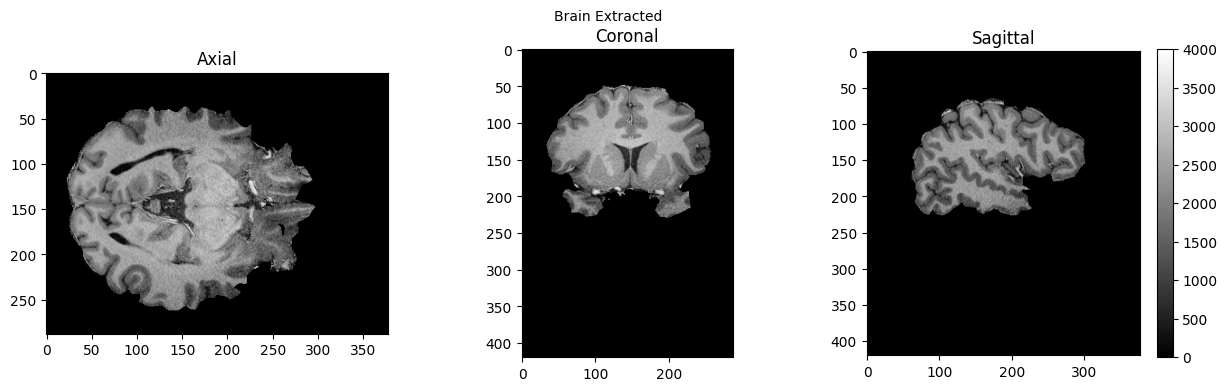
btr = fsl.BET()
btr.inputs.in_file = './sub-01_ses-01_7T_T1w_defaced.nii'
btr.inputs.frac = 0.4
btr.inputs.out_file = './sub-01_ses-01_7T_T1w_defaced_brain.nii'
res = btr.run()

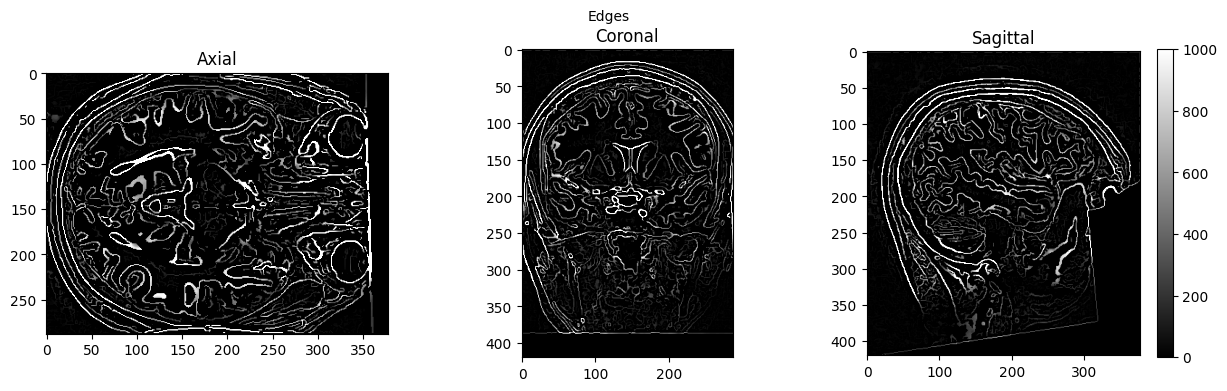
edge3 = afni.Edge3()
edge3.inputs.in_file = './sub-01_ses-01_7T_T1w_defaced.nii'
edge3.inputs.out_file = './sub-01_ses-01_7T_T1w_defaced_edges.nii'
edge3.inputs.datum = 'byte'
res = edge3.run()
251205-08:20:07,530 nipype.interface WARNING:
	 FSLOUTPUTTYPE environment variable is not set. Setting FSLOUTPUTTYPE=NIFTI
---------------------------------------------------------------------------
OSError                                   Traceback (most recent call last)
Cell In[7], line 8
      6 btr.inputs.frac = 0.4
      7 btr.inputs.out_file = './sub-01_ses-01_7T_T1w_defaced_brain.nii'
----> 8 res = btr.run()
     10 edge3 = afni.Edge3()
     11 edge3.inputs.in_file = './sub-01_ses-01_7T_T1w_defaced.nii'

File /opt/conda/lib/python3.13/site-packages/nipype/interfaces/base/core.py:401, in BaseInterface.run(self, cwd, ignore_exception, **inputs)
    399 # Run interface
    400 runtime = self._pre_run_hook(runtime)
--> 401 runtime = self._run_interface(runtime)
    402 runtime = self._post_run_hook(runtime)
    403 # Collect outputs

File /opt/conda/lib/python3.13/site-packages/nipype/interfaces/fsl/preprocess.py:163, in BET._run_interface(self, runtime)
    159 def _run_interface(self, runtime):
    160     # The returncode is meaningless in BET.  So check the output
    161     # in stderr and if it's set, then update the returncode
    162     # accordingly.
--> 163     runtime = super()._run_interface(runtime)
    164     if runtime.stderr:
    165         self.raise_exception(runtime)

File /opt/conda/lib/python3.13/site-packages/nipype/interfaces/base/core.py:756, in CommandLine._run_interface(self, runtime, correct_return_codes)
    753 cmd_path = which(executable_name, env=runtime.environ)
    755 if cmd_path is None:
--> 756     raise OSError(
    757         'No command "%s" found on host %s. Please check that the '
    758         "corresponding package is installed."
    759         % (executable_name, runtime.hostname)
    760     )
    762 runtime.command_path = cmd_path
    763 runtime.dependencies = (
    764     get_dependencies(executable_name, runtime.environ)
    765     if self._ldd
    766     else "<skipped>"
    767 )

OSError: No command "bet" found on host 992a9059675a. Please check that the corresponding package is installed.
%ls
AA_Neurodesk_demo_tour.ipynb  nipype_short.ipynb
MRIQC.ipynb                   papermill-slurm-submission-example.ipynb
PyBIDS.ipynb                  pydra_preproc_ants.ipynb
RISE_slideshow.ipynb          sub-01_ses-01_7T_T1w_defaced.nii
bids_conversion.ipynb         sub-01_ses-01_7T_T1w_defaced_brain.nii.gz
ds000114/                     sub-01_ses-01_7T_T1w_defaced_edges.nii
nipype_full.ipynb
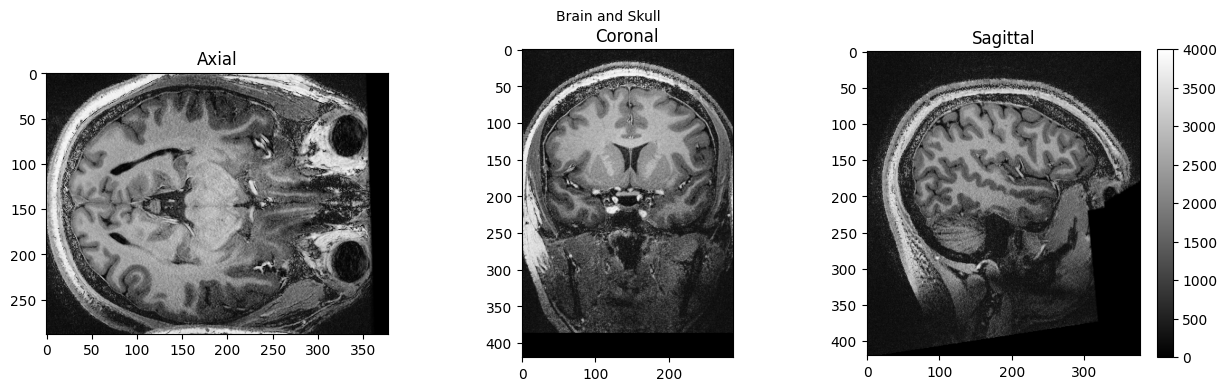
# View 3D data
import matplotlib.pyplot as plt

def view_slices_3d(image_3d, slice_nbr, vmin, vmax, title=''):
#   print('Matrix size: {}'.format(image_3d.shape))
  fig = plt.figure(figsize=(15, 4))
  plt.suptitle(title, fontsize=10)

  plt.subplot(131)
  plt.imshow(np.take(image_3d, slice_nbr, 2), vmin=vmin, vmax=vmax, cmap='gray')
  plt.title('Axial');

  plt.subplot(132)
  image_rot = ndimage.rotate(np.take(image_3d, slice_nbr, 1),90)
  plt.imshow(image_rot, vmin=vmin, vmax=vmax, cmap='gray')
  plt.title('Coronal');

  plt.subplot(133)
  image_rot = ndimage.rotate(np.take(image_3d, slice_nbr, 0),90)
  plt.imshow(image_rot, vmin=vmin, vmax=vmax, cmap='gray')
  plt.title('Sagittal');
  cbar=plt.colorbar()

def get_figure():
    """
    Returns figure and axis objects to plot on.
    """
    fig, ax = plt.subplots(1)
    plt.tick_params(top=False, right=False, which='both')
    ax.spines['top'].set_visible(False)
    ax.spines['right'].set_visible(False)
    return fig, ax
import nibabel as nib
from matplotlib import transforms
from scipy import ndimage
import numpy as np

# load data
brain_full = nib.load('./sub-01_ses-01_7T_T1w_defaced.nii').get_fdata()
brain = nib.load('./sub-01_ses-01_7T_T1w_defaced_brain.nii.gz').get_fdata()
edges = nib.load('./sub-01_ses-01_7T_T1w_defaced_edges.nii').get_fdata()
view_slices_3d(brain_full, slice_nbr=230, vmin=0, vmax=4000, title='Brain and Skull')
view_slices_3d(brain, slice_nbr=230, vmin=0, vmax=4000, title='Brain Extracted')
view_slices_3d(edges, slice_nbr=230, vmin=0, vmax=1000, title='Edges')
from ipyniivue import NiiVue

nv = NiiVue()
nv.load_volumes([{"path": "./sub-01_ses-01_7T_T1w_defaced_brain.nii.gz"}])
nv
from IPython.display import Image
Image(url='https://raw.githubusercontent.com/NeuroDesk/example-notebooks/refs/heads/main/books/images/sub-01_ses-01_7T_T1w_defaced_brain.png')

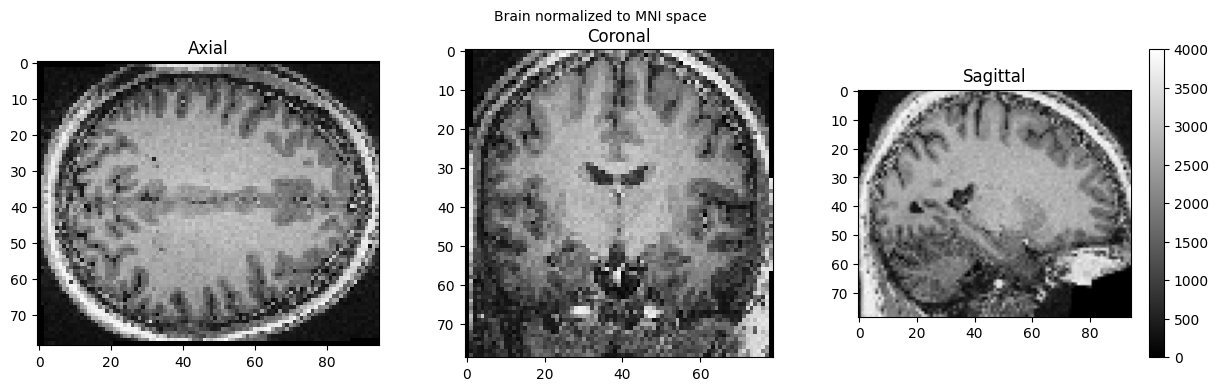
SPM can also be used in such a workflow, but unfortunately, this will trigger a warning “stty: ‘standard input’: Inappropriate ioctl for device”, which you can ignore (or help us to find out where it comes from):
import nipype.interfaces.spm as spm

norm12 = spm.Normalize12()
norm12.inputs.image_to_align = './sub-01_ses-01_7T_T1w_defaced.nii'
norm12.run()
stty: 'standard input': Inappropriate ioctl for device
stty: 'standard input': Inappropriate ioctl for device
<nipype.interfaces.base.support.InterfaceResult at 0x7f7aaa6048d0>
brain_full = nib.load('./wsub-01_ses-01_7T_T1w_defaced.nii').get_fdata()
view_slices_3d(brain_full, slice_nbr=50, vmin=0, vmax=4000, title='Brain normalized to MNI space')
nv = NiiVue()
nv.load_volumes([{"path": "./wsub-01_ses-01_7T_T1w_defaced.nii"}])
nv
Image(url='https://raw.githubusercontent.com/NeuroDesk/example-notebooks/refs/heads/main/books/images/wsub-01_ses-01_7T_T1w_defaced.png')

Dependencies in Jupyter/Python#
Using the package watermark to document system environment and software versions used in this notebook
%load_ext watermark

%watermark
%watermark --iversions
Last updated: 2025-10-31T00:29:05.110304+00:00

Python implementation: CPython
Python version       : 3.11.6
IPython version      : 8.16.1

Compiler    : GCC 12.3.0
OS          : Linux
Release     : 5.4.0-204-generic
Machine     : x86_64
Processor   : x86_64
CPU cores   : 32
Architecture: 64bit

ipyniivue : 2.3.2
nibabel   : 5.2.1
matplotlib: 3.8.4
IPython   : 8.16.1
numpy     : 2.2.6
nipype    : 1.8.6
scipy     : 1.13.0