MFCSC estimates mismatch between functional connectivity (FC) and structural connectivity (SC). This walkthrough uses the public example accompanying the software, then opens the actual results in a local browser report. The compiled Neurodesk tool runs without a MATLAB licence.
General use: open MFCSC
In Neurodesktop’s bottom-left Applications menu, choose Neurodesk (1) → Functional Imaging (2) → mfcsc (3) → mfcsc 1.1 (4).

This opens a terminal with [mfcsc/1.1] in the prompt. Paste the example’s commands after that prompt. For your own inputs, the four required arguments are the pairing file, FC folder, SC folder and output folder:
mfcsc input/FC_SC_list.txt input/FC input/SC outputEach row of the pairing file must identify a functional matrix and its matching structural matrix. Both must describe the same regions in the same order. Consult the upstream input specification before using new datasets.
Worked example: public resting-state FC and diffusion SC
1. Download the input folder
Open Firefox inside Neurodesk and visit the OSF example files. Click the input folder, then Download As Zip (1). Check that the current folder is input, as shown below.
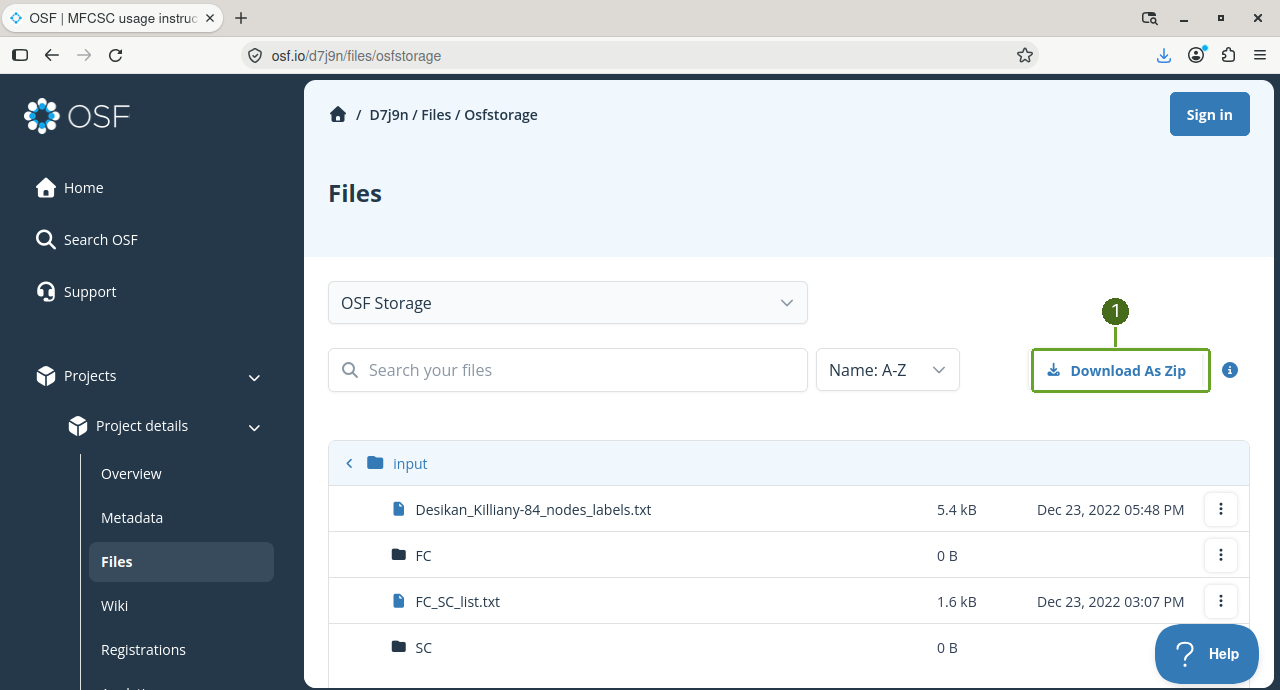
Wait for d7j9n-osfstorage-input-archive.zip to appear in Firefox’s Downloads. The archive is approximately 6.5 MB. These public files do not require an OSF sign-in.
2. Extract and check the input files
Return to the MFCSC terminal opened from the application menu. Paste these commands there, pressing Enter after each line:
mkdir -p ~/neurodesktop-storage/mfcsc-demo/input
unzip -nq ~/Downloads/d7j9n-osfstorage-input-archive.zip -d ~/neurodesktop-storage/mfcsc-demo/input
cd ~/neurodesktop-storage/mfcsc-demo
ls input
The Zip contains the folder’s contents directly. The explicit -d …/input destination creates the layout used by the processing command. -nq preserves existing files and extracts quietly.

You should see FC, SC, FC_SC_list.txt and Desikan_Killiany-84_nodes_labels.txt. The supplied example has 50 participant pairs and 84 regions.
Check the pairing list in this terminal:
head -n 3 input/FC_SC_list.txt
wc -l input/FC_SC_list.txt
Each row has an FC filename in the first column and its matching SC filename in the second, separated by a tab. The line count should be 50. Check the participant identifiers before processing; matching file counts alone do not establish correct pairing.
3. Run MFCSC
In the MFCSC terminal, run:
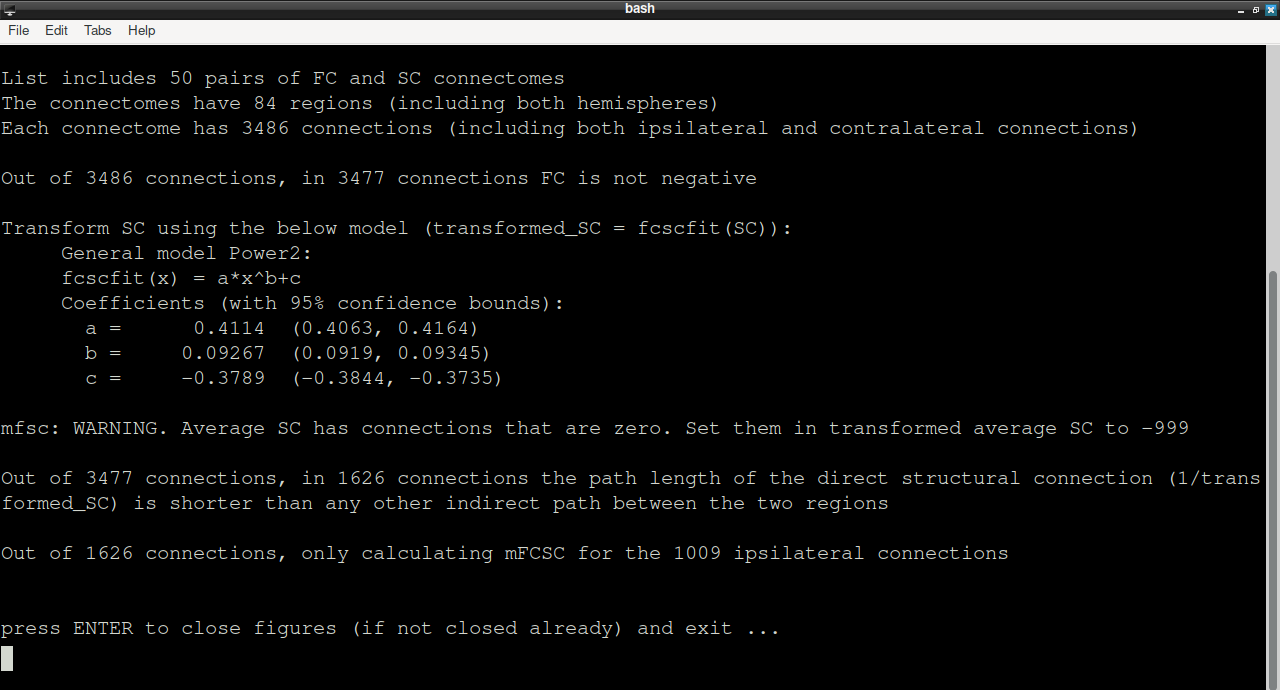
mfcsc input/FC_SC_list.txt input/FC input/SC output | tee mfcsc-run.logMFCSC reports 50 pairs and 84 regions before fitting its transformations and calculating the mismatch matrices. The log is also saved as mfcsc-run.log.
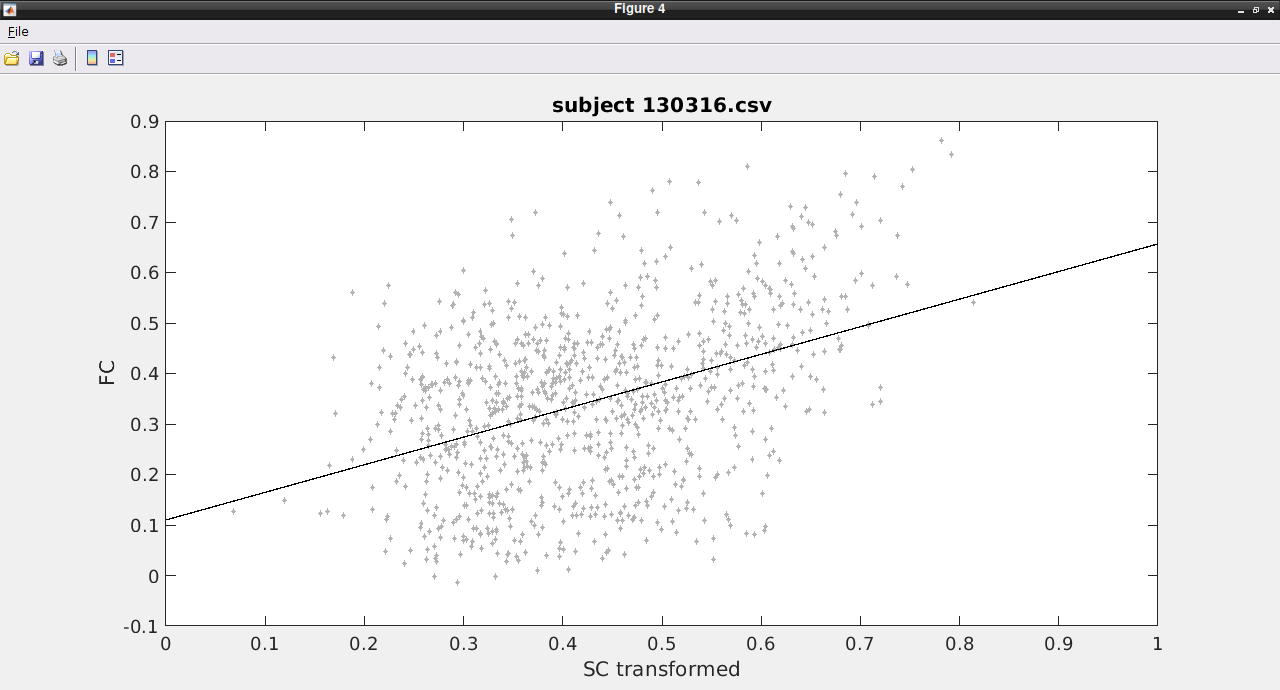
The tested build opens diagnostic figures, including a group transformation and participant fits. Maximise a figure by double-clicking its title bar.
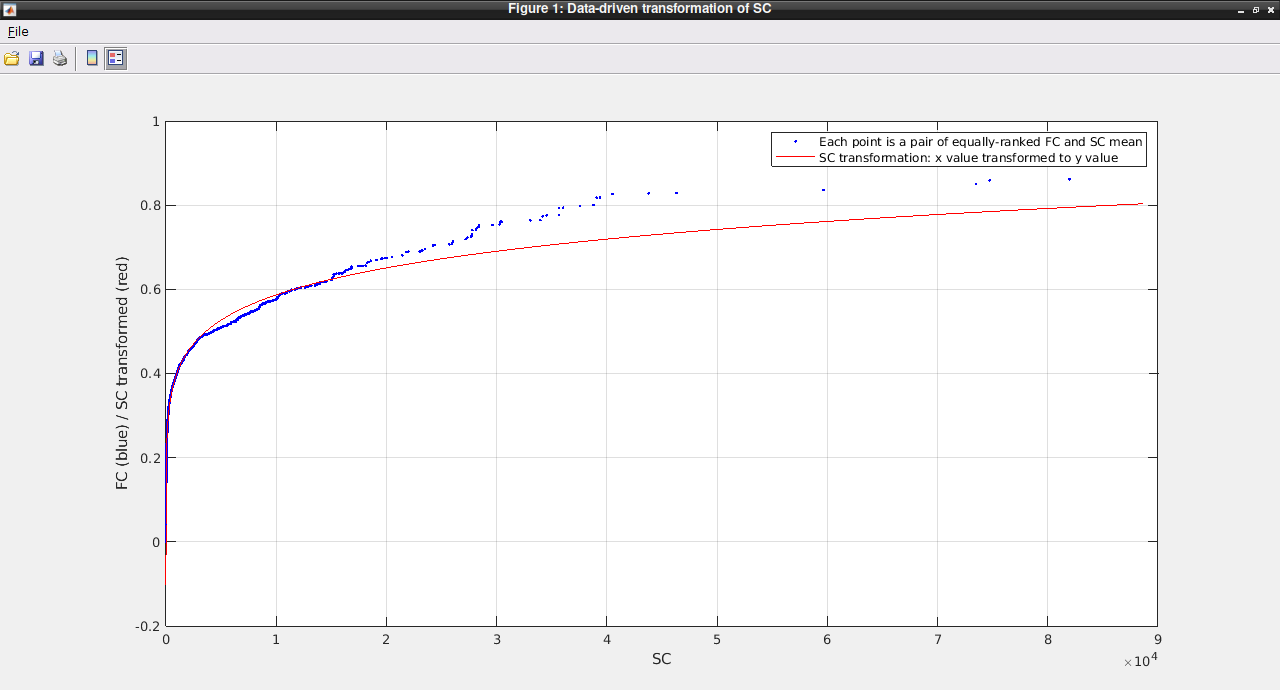
The group plot compares equally ranked mean FC and SC values. A participant plot compares FC with transformed SC for that participant and shows its fitted line.
When the terminal displays press ENTER to close figures (if not closed already) and exit, return to that terminal and press Enter. The figures close and the shell prompt returns.
The output folder now contains:
50
mFCSC-…-masked.csvfiles: one mismatch matrix per paired participant.mask.csv: the final connection mask used by this Neurodesk build.group_connectomes/: group-average matrices and intermediate masks.
4. Check and display the results
Download inspect_mfcsc.py in Firefox inside Neurodesk, saving it in Downloads. This small companion script checks the example’s file pairing and matrix dimensions, reports invalid values, and creates a report for viewing. It uses NumPy and Matplotlib from the Neurodesk base Python environment.
Run it in the MFCSC terminal:
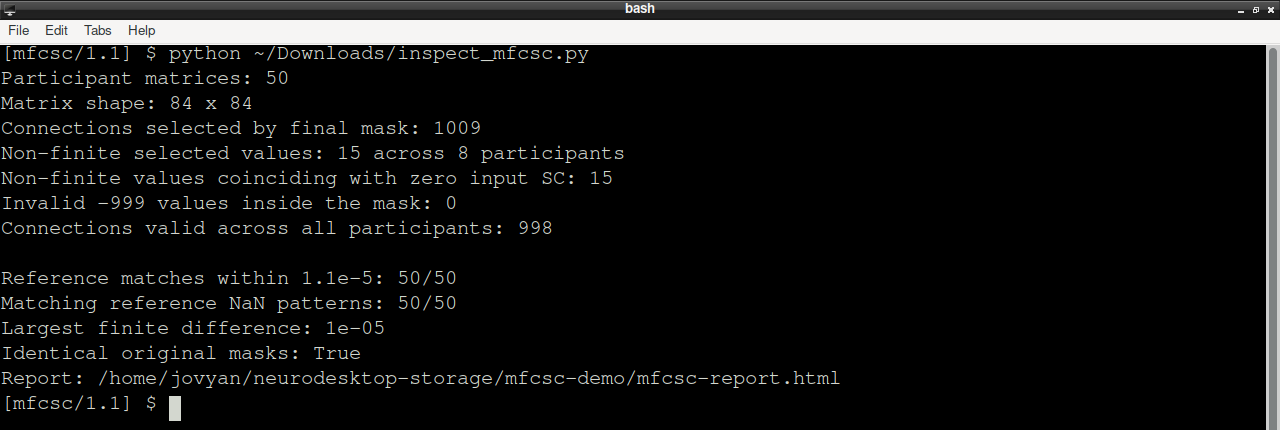
python ~/Downloads/inspect_mfcsc.pyThe tested run produced 50 matrices of size 84 × 84. Its original mask selects 1,009 connections, but 15 selected values across eight participants are non-finite. All 15 coincide with zero entries in the input SC matrices. The checker creates a separate common-valid-mask.csv that retains 998 connections valid across all 50 participants. It preserves the original outputs.
Values of −99 indicate excluded connections; −999 and non-finite values must also be excluded. They must not be interpreted as large negative mismatch scores or replaced with valid zero scores.
Open the generated report from this terminal:
firefox --new-window "file://$HOME/neurodesktop-storage/mfcsc-demo/mfcsc-report.html"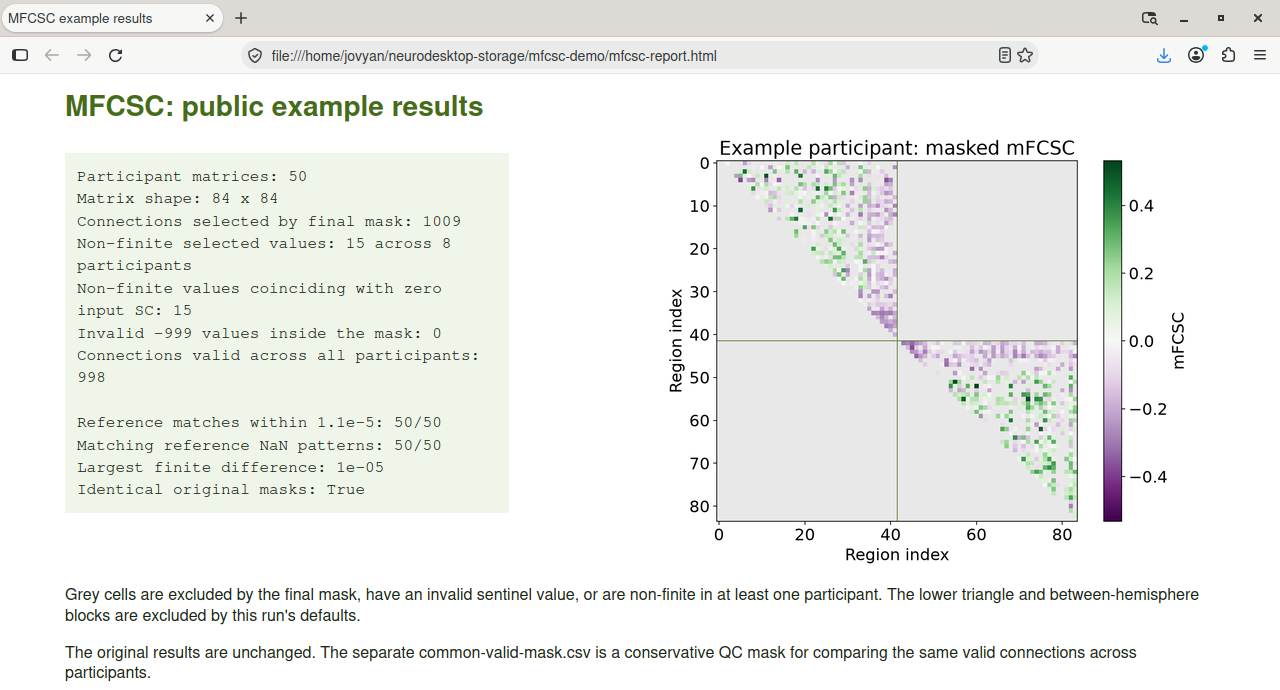
The report displays the first participant’s matrix using the common valid mask. Grey cells are excluded. The colour scale distinguishes positive and negative mismatch around zero. This run uses the tool’s default upper-triangle, within-hemisphere output, so the lower triangle and between-hemisphere blocks are grey. Region indices follow the supplied region-label file.
The common mask is a conservative choice for comparing the same connections across participants. It excludes undefined scores; it does not recover a score for a missing connection.
5. Compare with the published reference
In Firefox, return to the OSF files, open output, and use Download As Zip again. Wait for d7j9n-osfstorage-output-archive.zip in Downloads.
In the MFCSC terminal, extract it into a separate comparison folder and rerun the checker:
cd ~/neurodesktop-storage/mfcsc-demo
mkdir -p reference
unzip -nq ~/Downloads/d7j9n-osfstorage-output-archive.zip -d reference
python ~/Downloads/inspect_mfcsc.py
The checker adds the comparison to the report and writes reference-check.txt. In the tested example, all 50 matrices agree within an absolute tolerance of 0.000011; the largest finite difference is approximately 0.00001. The original masks and the locations of all non-finite values match the reference. Thus the undefined entries are also present in the published example, rather than being unique to this Neurodesk run.
Reopen or refresh mfcsc-report.html to see the comparison, as in the screenshot above. Keep the processing log, quality checks and chosen comparison mask with your analysis.
Use your own paired modalities
The same four-argument workflow can be used with appropriately prepared MEG and diffusion connectomes. Put the functional matrices in a separate folder, pair each with its corresponding structural matrix in a tab-separated list, and retain identical region definitions and ordering across both modalities. Review the MFCSC method and its interpretation before drawing conclusions from the mismatch scores.
References and data acknowledgments
When using MFCSC, authors should cite:
Civier O, Sourty M, Calamante F (2023) MFCSC: Novel method to calculate mismatch between functional and structural brain connectomes, and its application for detecting hemispheric functional specialisations. Scientific Reports https://
doi .org /10 .1038 /s41598 -022 -17213-z
Rubinov M, Sporns O (2010) Complex network measures of brain connectivity: Uses and interpretations. NeuroImage 52:1059-69.
When using the structural connectivity matrices from OSF, authors should cite:
Civier O, Smith RE, Yeh CH, Connelly A, Calamante F (2019) Is removal of weak connections necessary for graph-theoretical analysis of dense weighted structural connectomes from diffusion MRI? NeuroImage Civier et al. (2019)
... and include the following acknowledgment:
Data were provided by the Human Connectome Project, WU-Minn Consortium (Principal Investigators: David Van Essen and Kamil Ugurbil; 1U54MH091657) funded by the 16 NIH Institutes and Centers that support the NIH Blueprint for Neuroscience Research; and by the McDonnell Center for Systems Neuroscience at Washington University, St. Louis, MO.
When using the functional connectivity matrices from OSF, authors should cite:
Civier O, Sourty M, Calamante F (2023) MFCSC: Novel method to calculate mismatch between functional and structural brain connectomes, and its application for detecting hemispheric functional specialisations. Scientific Reports Civier et al. (2023)
... and include the following acknowledgment:
Data were provided by the Human Connectome Project, WU-Minn Consortium (Principal Investigators: David Van Essen and Kamil Ugurbil; 1U54MH091657) funded by the 16 NIH Institutes and Centers that support the NIH Blueprint for Neuroscience Research; and by the McDonnell Center for Systems Neuroscience at Washington University, St. Louis, MO.
Software acknowledgments
National Health and Medical Research Council of Australia (grant numbers APP1091593 andAPP1117724)
Australian Research Council (grant number DP170101815)
National Imaging Facility (NIF), a National Collaborative Research Infrastructure Strategy (NCRIS) capability at Swinburne Neuroimaging, Swinburne University of Technology.
Victorian Government’s Operational Infrastructure Support
Melbourne Bioinformatics at the University of Melbourne (grant number UOM0048)
Sydney Informatics Hub and the University of Sydney’s high performance computing cluster Artemis
Australian Electrophysiology Data Analytics PlaTform (AEDAPT); Australian Research Data Commons
- Civier, O., Sourty, M., & Calamante, F. (2023). MFCSC: Novel method to calculate mismatch between functional and structural brain connectomes, and its application for detecting hemispheric functional specialisations. Scientific Reports, 13(1). 10.1038/s41598-022-17213-z
- Civier, O., Smith, R. E., Yeh, C.-H., Connelly, A., & Calamante, F. (2019). Is removal of weak connections necessary for graph-theoretical analysis of dense weighted structural connectomes from diffusion MRI? NeuroImage, 194, 68–81. 10.1016/j.neuroimage.2019.02.039