Run this notebook
Purpose
MRI phase data are inherently wrapped — phase values outside the range “wrap around”, creating artificial discontinuities. Phase unwrapping recovers the true, continuous phase signal, which is essential for downstream analyses such as quantitative susceptibility mapping (QSM) and field mapping.
This tutorial demonstrates how to:
Download a demo dataset with magnitude and phase images
Prepare the data for unwrapping
Run ROMEO (Robust phase unwrapping) to recover continuous phase
Citation and Resources
Tools used in this workflow
- ROMEO
- Dymerska, B., Eckstein, K., et al. (2021). Phase unwrapping with a rapid opensource minimum spanning tree algorithm (ROMEO). Magnetic Resonance in Medicine, 85(4), 2294–2308. Dymerska et al. (2020)
Educational resources
Prerequisites
A running Neurodesktop VNC session
Familiarity with entering commands in a terminal
No additional installation required — ROMEO is pre-installed in Neurodesk
Load software tools and download demo data
We use the same demo dataset as the SWI tutorial. Open a terminal in Neurodesktop and run the following commands to download the data, then copy and prepare the magnitude and phase files for ROMEO.
The terminal in Neurodesktop.
mkdir -p ~/neurodesktop-storage/swi-demo/
curl -fL --retry 5 --retry-all-errors -o ~/neurodesktop-storage/swi-demo/01_bids.zip \
   https://huggingface.co/datasets/neurodeskorg/qsm-testdata/resolve/c97dfec3f16c6f4b5570e260a323931ed48db9ef/01_bids.zip

unzip -o ~/neurodesktop-storage/swi-demo/01_bids.zip -d ~/neurodesktop-storage/swi-demo/
Now copy the magnitude and phase files into a dedicated working directory:
mkdir -p ~/neurodesktop-storage/romeo-demo/

cp ~/neurodesktop-storage/swi-demo/01_bids/sub-170705134431std1312211075243167001/ses-1/anat/sub-170705134431std1312211075243167001_ses-1_run-1_part-phase_T2starw.nii \
   ~/neurodesktop-storage/romeo-demo/phase.nii

cp ~/neurodesktop-storage/swi-demo/01_bids/sub-170705134431std1312211075243167001/ses-1/anat/sub-170705134431std1312211075243167001_ses-1_run-1_part-mag_T2starw.nii \
   ~/neurodesktop-storage/romeo-demo/mag.nii
Both copied input files are approximately 16 MB.
Run ROMEO for phase unwrapping
Open Neurodesk → Phase Processing → romeo → romeo 3.2.8, then run the following command in the new ROMEO container terminal.
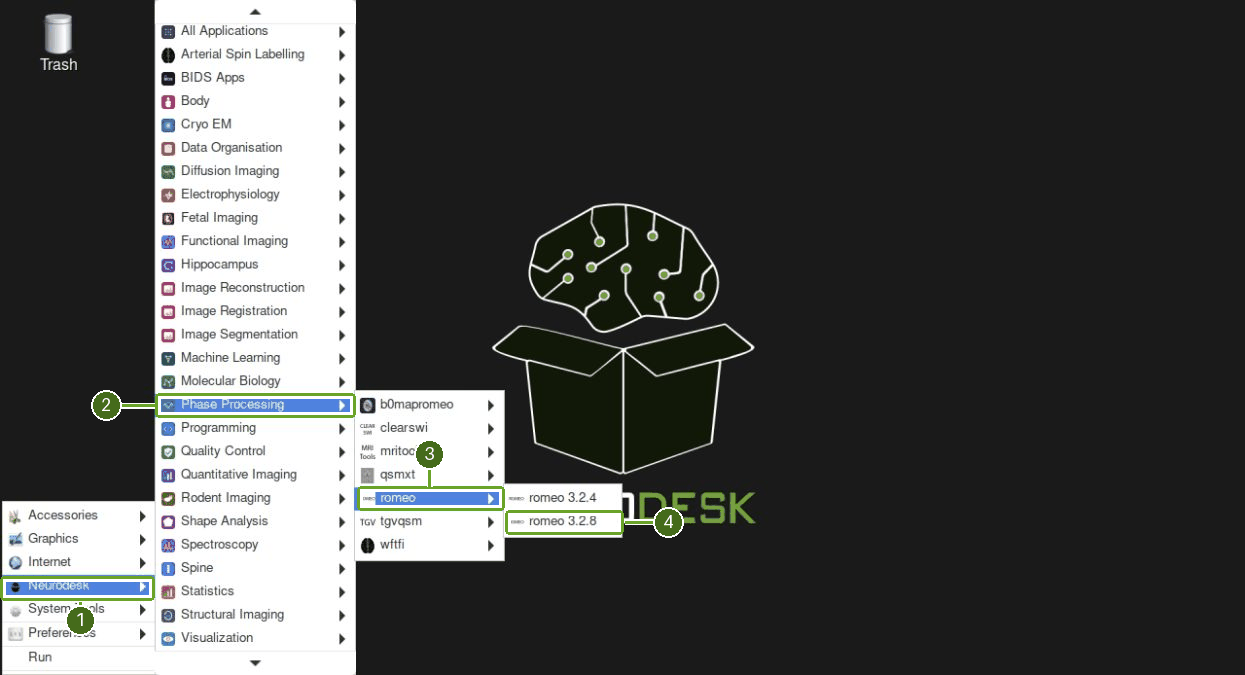
romeo \
  -p ~/neurodesktop-storage/romeo-demo/phase.nii \
  -m ~/neurodesktop-storage/romeo-demo/mag.nii \
  -k nomask \
  -o ~/neurodesktop-storage/romeo-demo/
The command returns to the prompt. unwrapped.nii and settings_romeo.txt confirm that the output was written.
Inspect the results
Verify the output in the ROMEO terminal:
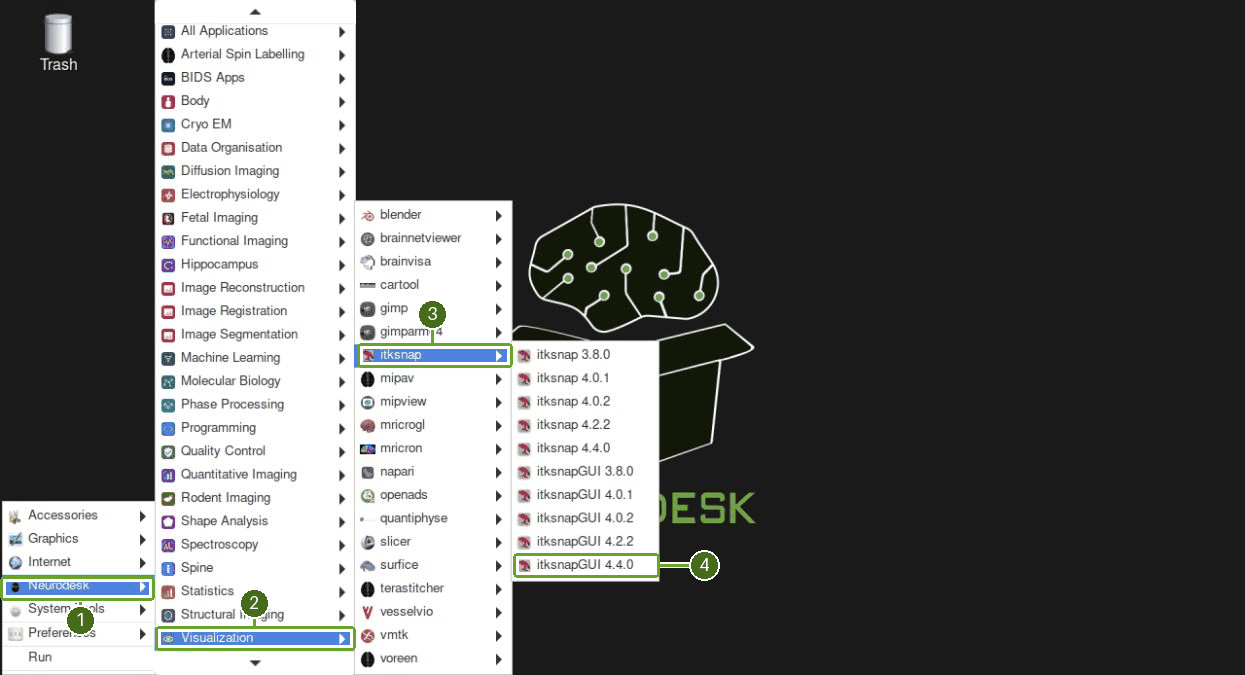
ls ~/neurodesktop-storage/romeo-demo/Open Neurodesk → Visualization → itksnap → itksnapGUI 4.4.0. Choose No if asked whether to change the radiological layout preferences.
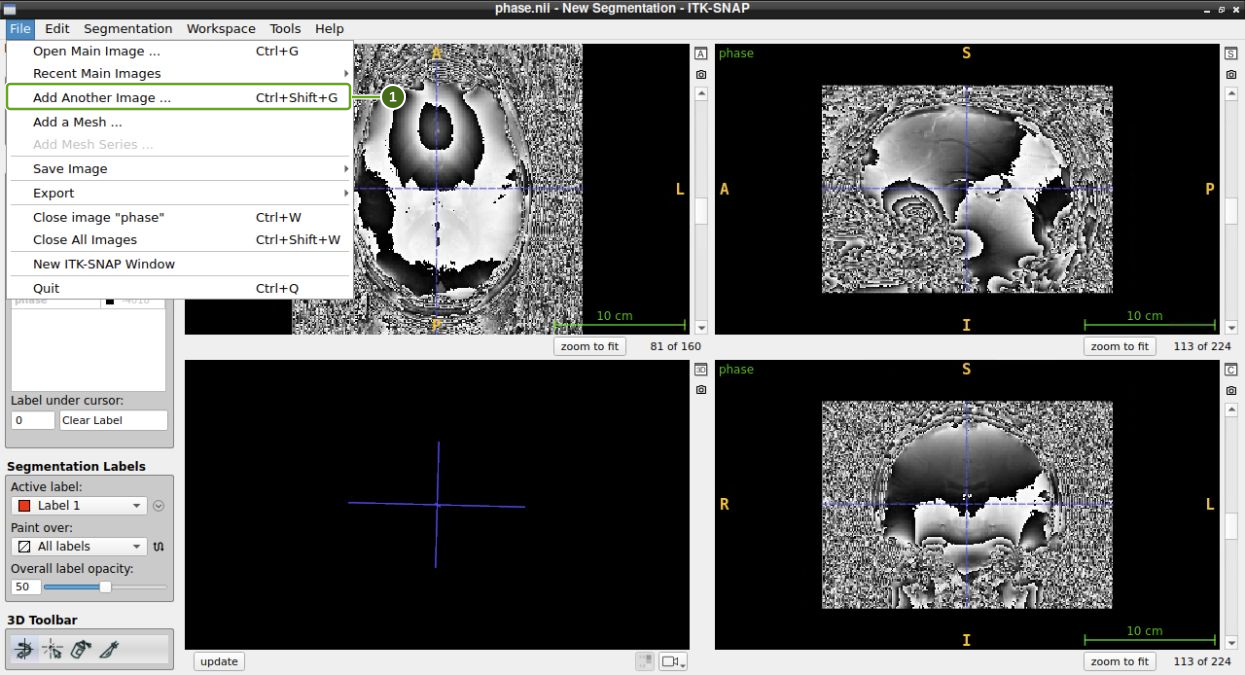
Choose File → Open Main Image…, enter
/home/jovyan/neurodesktop-storage/romeo-demo/phase.nii, then click Next and Finish.Choose File → Add Another Image…, enter
/home/jovyan/neurodesktop-storage/romeo-demo/unwrapped.nii, then click Next and Finish.
Click the small tiled-layout button beside a slice view to compare both layers. Choose Tools → Image Contrast → Auto-Adjust Contrast (all layers).
With
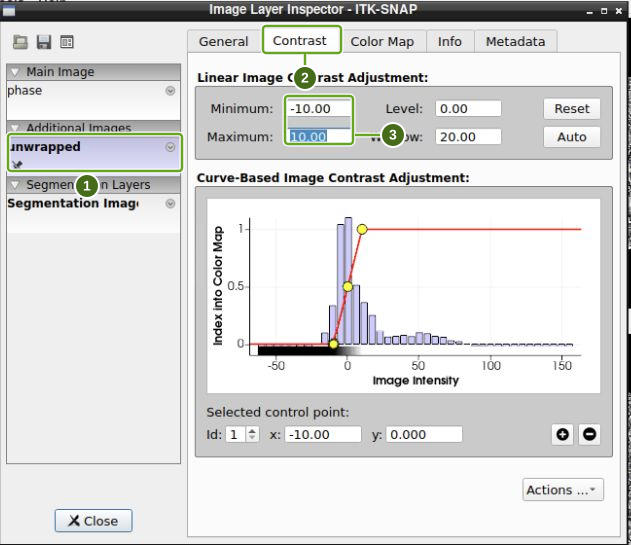
-k nomask, noisy background values can make the unwrapped brain look dark. Open Tools → Layer Inspector…, select unwrapped and the Contrast tab. For this demo, set Minimum to-10and Maximum to10, pressing Enter after each value, then Close. These settings change the display only.
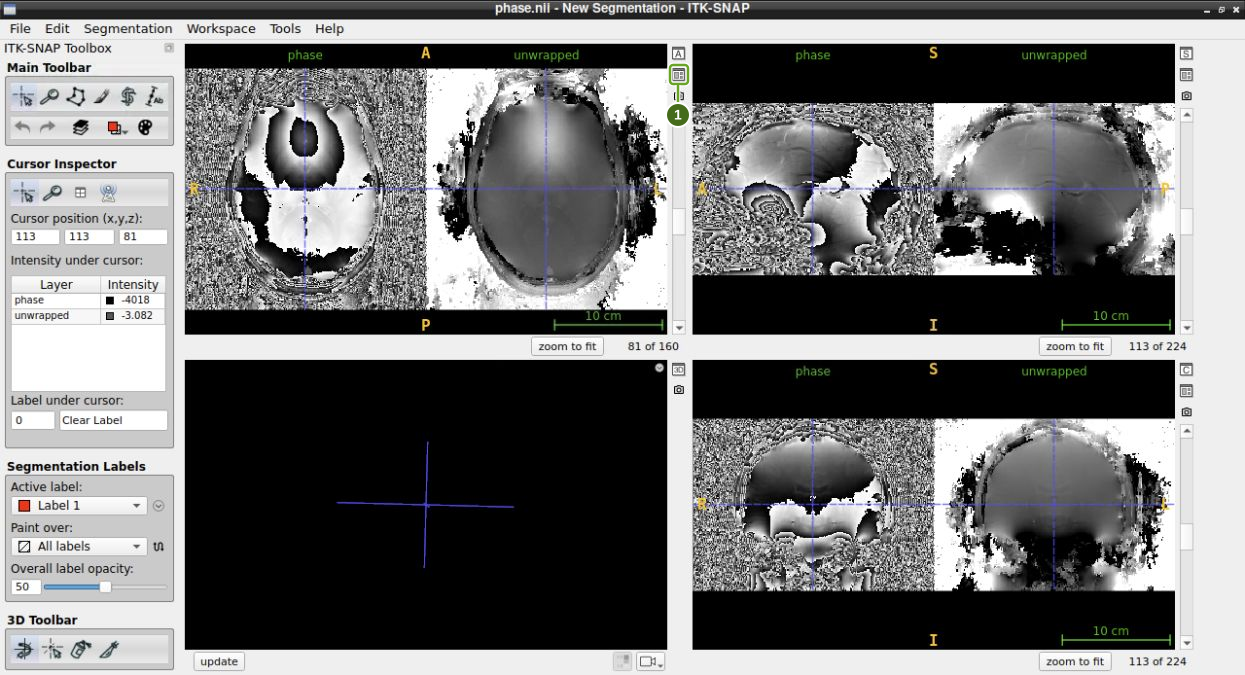
Each panel shows wrapped phase on the left and unwrapped phase on the right. The sharp phase jumps disappear within the brain; background noise remains because this example deliberately disables masking.
Summary
In this tutorial you:
Downloaded and prepared magnitude and phase MRI data
Used ROMEO to perform robust phase unwrapping
Compared the wrapped and unwrapped phase images
- Dymerska, B., Eckstein, K., Bachrata, B., Siow, B., Trattnig, S., Shmueli, K., & Robinson, S. D. (2020). Phase unwrapping with a rapid opensource minimum spanning tree algorithm (ROMEO). Magnetic Resonance in Medicine, 85(4), 2294–2308. 10.1002/mrm.28563