Structural connectivity from diffusion MRI
This example follows one HCP subject through a standard MRtrix3 workflow. It uses 100,000 streamlines so the example is practical to run; increase that number only when you have enough time and storage for a larger tractogram.
Run this tutorial in the Neurodesktop graphical desktop, either through Neurodesk Play or a local Neurodesktop installation. Use a desktop terminal for the processing commands and MRview for the image checks. The screenshots were captured from native desktop windows in Neurodesk Play using MRtrix3 3.0.3, FSL 6.0.5.1 and FreeSurfer 7.4.1.
1. Prepare the data
Download the subject 100307 files from the linked structural archive and diffusion archive. Extract both into a folder on Neurodesk storage. Keep the HCP directory structure intact. The subject folder should contain:
100307/
├── MNINonLinear/
└── T1w/
│   ├── Diffusion/
│   │   ├── bvals
│   │   ├── bvecs
│   │   └── data.nii.gz
│   └── T1w_acpc_dc_restore_brain.nii.gz
Step 4 generates the cortical and subcortical parcellation from the supplied T1w image. You do not need an additional HCP parcellation download. The structural archive also contains MNINonLinear/aparc+aseg.nii.gz; do not use that file with the T1w-to-diffusion transform below, because it is in MNI space.
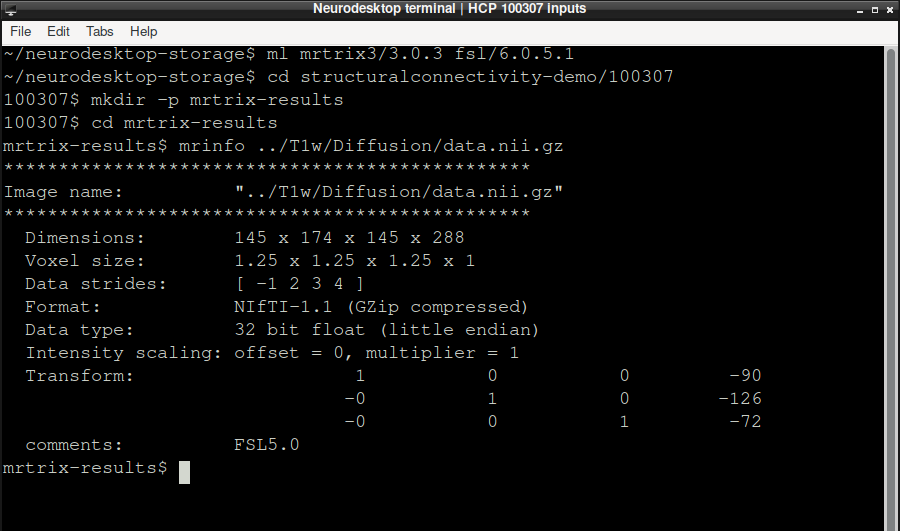
In JupyterLab, open Neurodesktop VNC from the Launcher to enter the graphical desktop. Open its terminal from the desktop applications menu. Load MRtrix3 and FSL there. Change /data/your-folder/100307 to the subject folder you created, then confirm that MRtrix3 can read the diffusion image:
ml mrtrix3/3.0.3 fsl/6.0.5.1
cd /data/your-folder/100307
mkdir -p mrtrix-results
cd mrtrix-results
mrinfo ../T1w/Diffusion/data.nii.gz
The header lists 288 diffusion volumes at 1.25 mm isotropic resolution and confirms that the image is readable before any processing starts. The workflow writes about 10 GB of intermediate images, so make sure the storage holding mrtrix-results has that much free space.
2. Prepare diffusion and anatomy images
MRtrix reads the compressed NIfTI directly, so there is no need to expand data.nii.gz into a multi-gigabyte file. Convert the image and import its FSL gradient table:
mrconvert ../T1w/Diffusion/data.nii.gz DWI.mif \
  -fslgrad ../T1w/Diffusion/bvecs ../T1w/Diffusion/bvals \
  -datatype float32 -stride 0,0,0,1

dwibiascorrect ants DWI.mif DWI_bias.mif -bias bias.mif
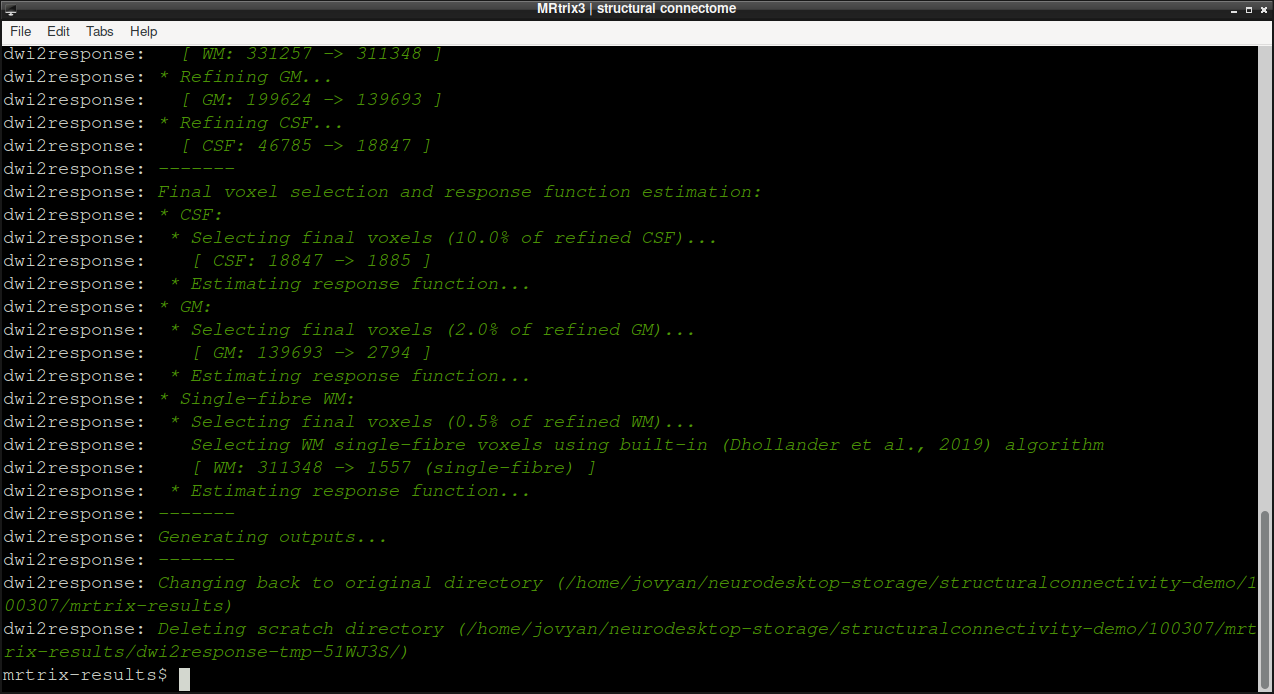
dwi2response dhollander DWI_bias.mif response_wm.txt response_gm.txt response_csf.txt
dwi2response prints the voxel selection it used for each tissue before writing the three response-function files. The Neurodesk MRtrix3 container already includes the ANTs and FSL commands that these scripts call, so no extra modules are needed.
Estimate the fibre orientation distributions (FODs) with multi-shell multi-tissue CSD and normalise them:
dwi2mask DWI_bias.mif DWI_mask.mif
dwi2fod msmt_csd DWI_bias.mif \
  response_wm.txt wmfod.mif response_gm.txt gm.mif response_csf.txt csf.mif \
  -mask DWI_mask.mif
mtnormalise wmfod.mif wmfod_norm.mif gm.mif gm_norm.mif csf.mif csf_norm.mif \
  -mask DWI_mask.mif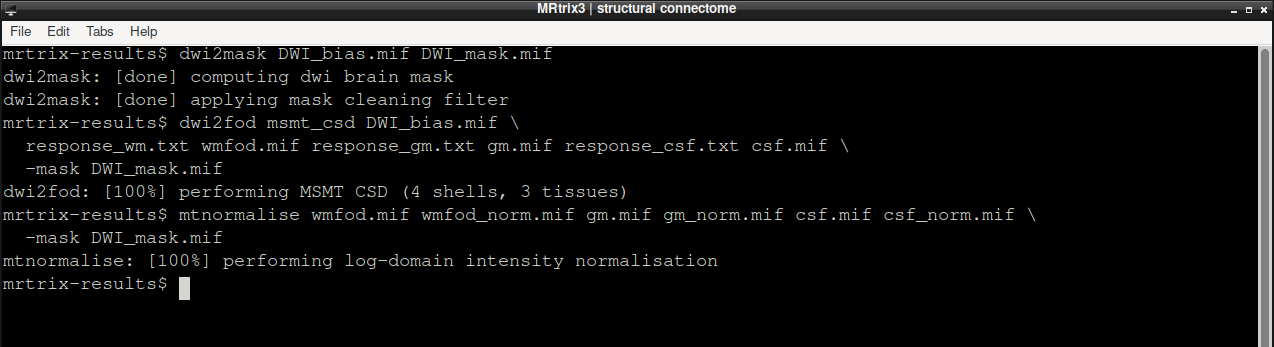
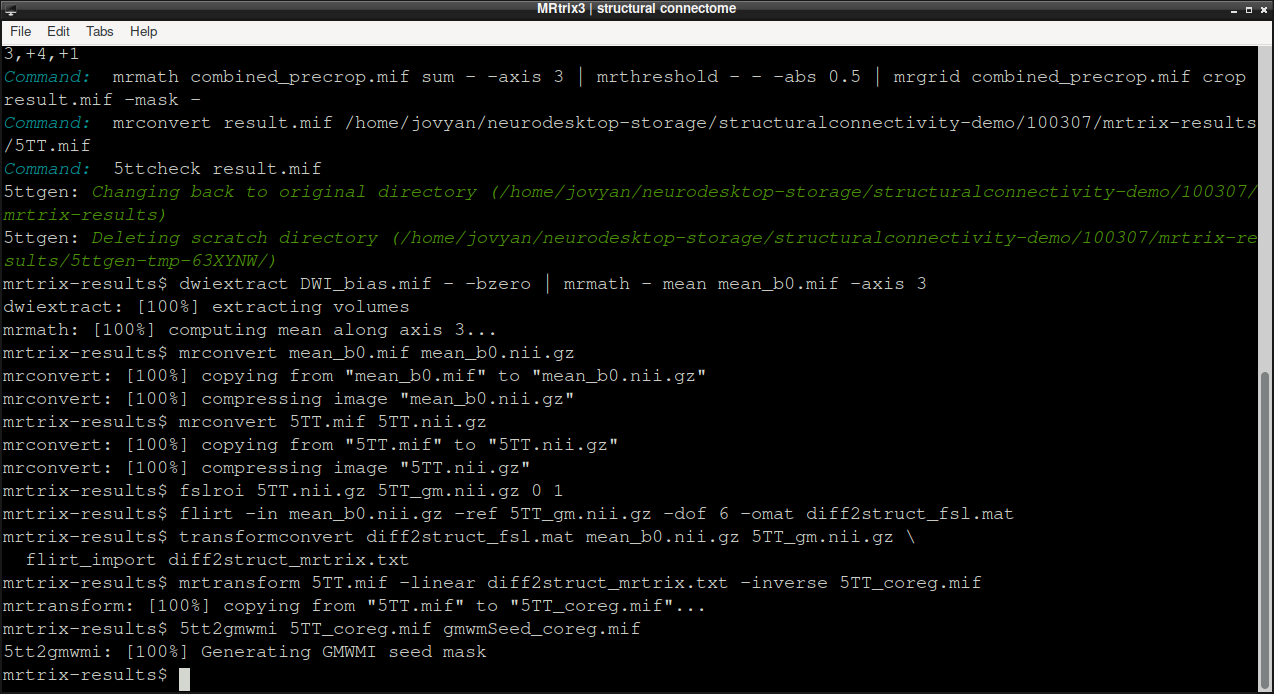
Create a five-tissue-type (5TT) image from the brain-extracted T1w image, then register its grey-matter volume to the diffusion mean b=0 image. The transform will later align both the 5TT image and the parcellation with diffusion space.
5ttgen fsl ../T1w/T1w_acpc_dc_restore_brain.nii.gz 5TT.mif -premasked
dwiextract DWI_bias.mif - -bzero | mrmath - mean mean_b0.mif -axis 3
mrconvert mean_b0.mif mean_b0.nii.gz
mrconvert 5TT.mif 5TT.nii.gz
fslroi 5TT.nii.gz 5TT_gm.nii.gz 0 1
flirt -in mean_b0.nii.gz -ref 5TT_gm.nii.gz -dof 6 -omat diff2struct_fsl.mat
transformconvert diff2struct_fsl.mat mean_b0.nii.gz 5TT_gm.nii.gz \
  flirt_import diff2struct_mrtrix.txt
mrtransform 5TT.mif -linear diff2struct_mrtrix.txt -inverse 5TT_coreg.mif
5tt2gmwmi 5TT_coreg.mif gmwmSeed_coreg.mif
5ttgen fsl runs FSL’s FAST and FIRST inside the MRtrix3 container and takes roughly 15–20 minutes; the remaining commands finish in seconds.
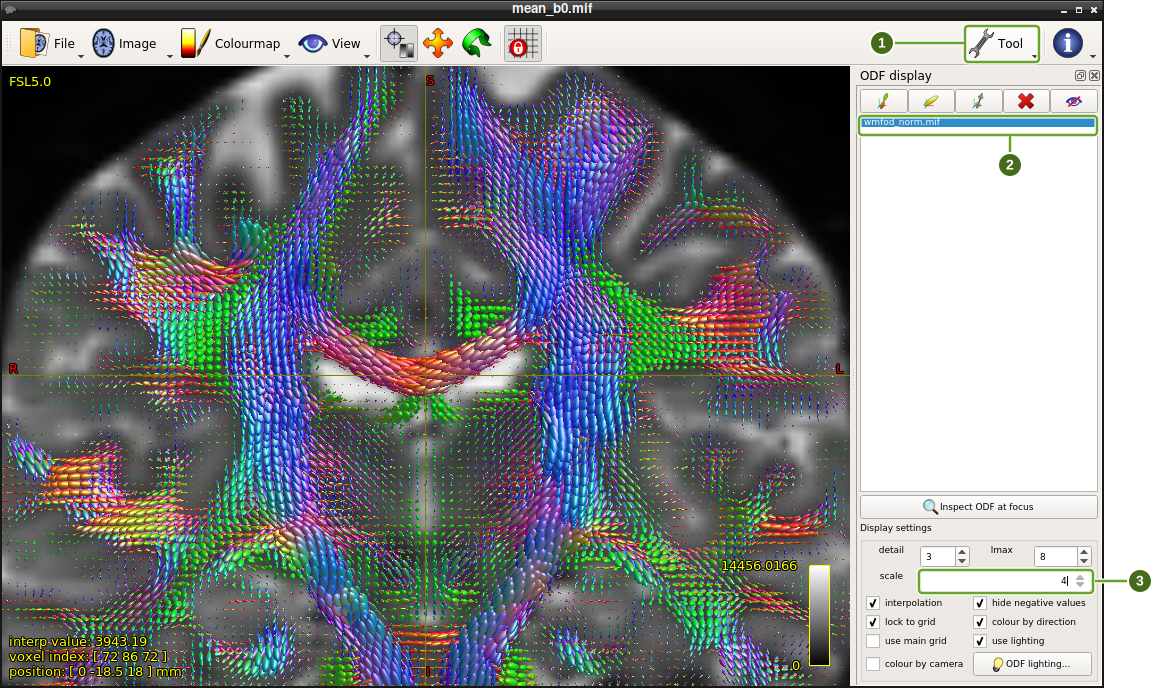
Now that mean_b0.mif exists, check the FODs before tracking. Load the mean b=0 image and overlay the normalised white-matter FODs; in a coronal slice the corpus callosum (red, left–right) and the corticospinal tracts (blue, superior–inferior) should be obvious, with crossing-fibre lobes where they meet:
mrview mean_b0.mif -plane 1 -odf.load_sh wmfod_norm.mifIn the MRview window:
Choose Tool → ODF display (1) to show the settings panel.
Select wmfod_norm.mif (2) in the loaded-image list. The eye button above the list hides or shows the glyphs.
Increase scale (3) to 4, leaving colour by direction checked. This changes the display size, not the FOD data.
Use View → Zoom in to bring the corpus callosum into view, as shown below. The red left–right lobes and blue superior–inferior lobes should follow the major white-matter pathways.
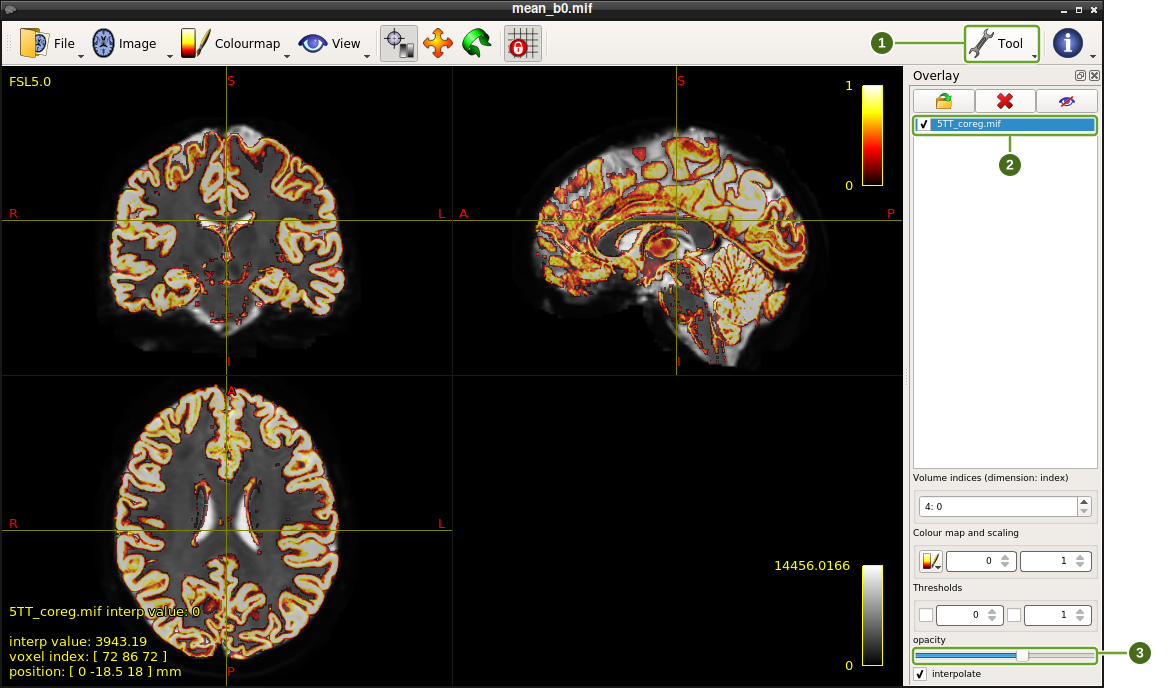
Confirm the registration by overlaying the coregistered 5TT image on the mean b=0 image. The first 5TT volume (cortical grey matter) should trace the cortical ribbon of the diffusion image in all three planes:
mrview mean_b0.mif -mode 2 -overlay.load 5TT_coreg.mif -overlay.opacity 0.6The command opens the three-plane view. If you need to return to it later, choose View → Ortho view or press F2.
Choose Tool → Overlay (1) to show the overlay controls.
Use the checkbox beside 5TT_coreg.mif (2) to hide and show the tissue map. Leave the volume index at 4: 0, the first 5TT volume.
Adjust opacity (3) to compare the overlay with the underlying anatomy; the screenshot uses 0.6.
Check that the cortical ribbon follows the anatomy in the coronal, sagittal and axial views. Close MRview to return to the terminal when you have finished.
3. Generate and filter a tractogram
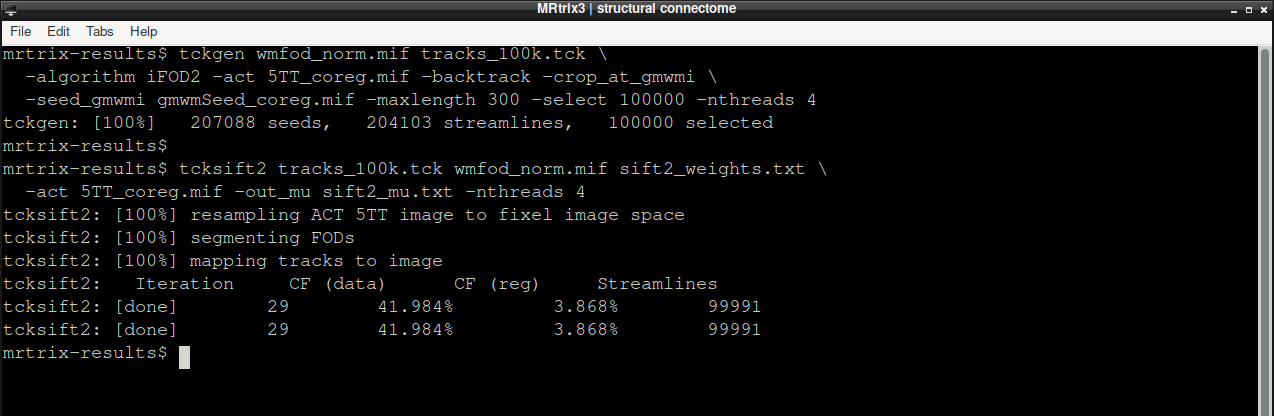
Generate a 100,000-streamline iFOD2 tractogram using grey–white matter interface seeding and anatomical constraints, then estimate a SIFT2 weight for each streamline:
tckgen wmfod_norm.mif tracks_100k.tck \
  -algorithm iFOD2 -act 5TT_coreg.mif -backtrack -crop_at_gmwmi \
  -seed_gmwmi gmwmSeed_coreg.mif -maxlength 300 -select 100000 -nthreads 4

tcksift2 tracks_100k.tck wmfod_norm.mif sift2_weights.txt \
  -act 5TT_coreg.mif -out_mu sift2_mu.txt -nthreads 4
tckgen reports how many seeds and streamlines it needed to select 100,000 that satisfy the anatomical constraints; with four threads it took about six minutes in the run shown. tcksift2 then prints its optimisation summary and writes one weight per streamline.
The tractogram size and run time depend on available Neurodesk resources. For a quick test, lower -select (for example, to 10000). Use a larger value for a research analysis and report it with the other processing settings.
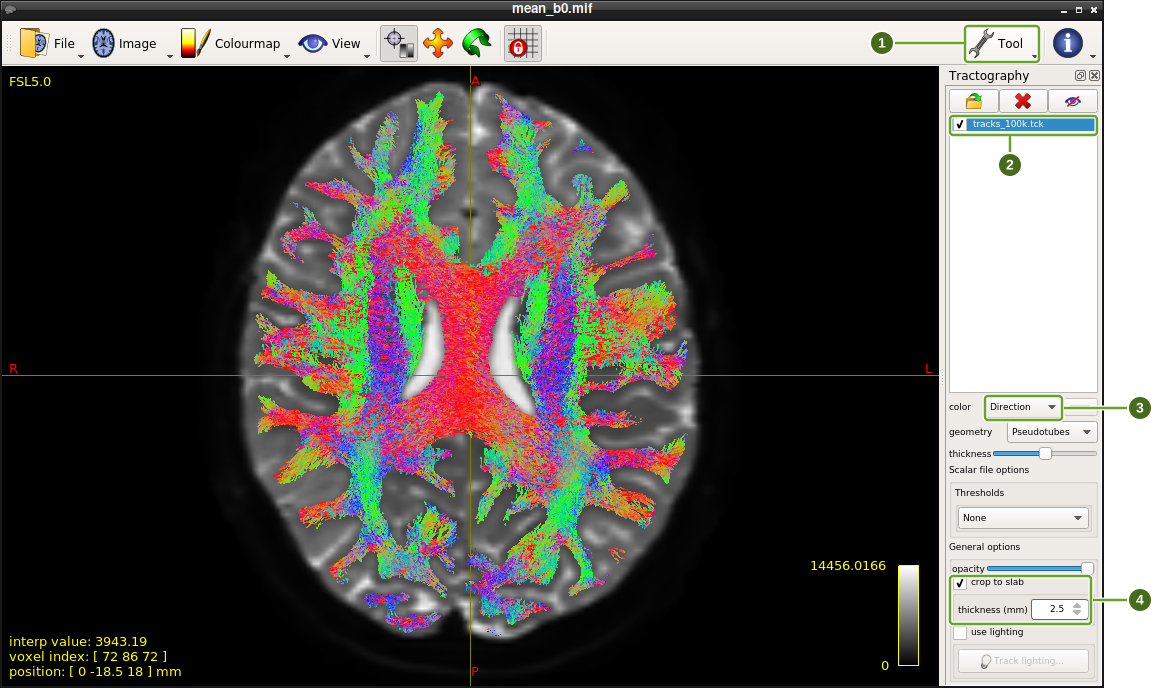
Inspect the streamlines in mrview before building the connectome. Directionally coloured streamlines should fill the white matter and stop at the cortex:
mrview mean_b0.mif -tractography.load tracks_100k.tckChoose Tool → Tractography (1).
Use the checkbox beside tracks_100k.tck (2) to hide and show the streamlines.
Keep color → Direction (3) so the colours encode streamline orientation.
Leave crop to slab (4) checked, with thickness (mm) → 2.5, to inspect the streamlines near the current slice rather than projecting the entire tractogram.
Move through the slices and compare the streamlines with the underlying white matter. Close MRview before continuing in the terminal.
4. Generate the parcellation and build the connectome
The original example used a precomputed FreeSurfer aparc+aseg image. Here we generate labels from the supplied T1w image with SynthSeg, included in FreeSurfer 7.4.1. The --parc option adds Desikan–Killiany cortical regions to the subcortical segmentation. This is a volumetric neural-network parcellation, not the surface-based recon-all pipeline, so its labels and connectivity values will differ from the original HCP reconstruction.
Run this in the same Neurodesktop terminal, from mrtrix-results:
ml freesurfer/7.4.1
mri_synthseg --i ../T1w/T1w_acpc_dc_restore_brain.nii.gz \
  --o parcellation_synthseg.nii.gz --parc --cpu --threads 8 \
  --qc synthseg_qc.csv
ml mrtrix3/3.0.3 fsl/6.0.5.1
SynthSeg internally resamples the input to 1 mm resolution while retaining its anatomical world coordinates. Check the resulting parcellation against the anatomy before continuing; in MRview, scroll through the brain and use the Overlay tool’s visibility checkbox to compare the labels with the underlying image:
mrview ../T1w/T1w_acpc_dc_restore_brain.nii.gz \
  -overlay.load parcellation_synthseg.nii.gz -overlay.opacity 0.5
The QC CSV is an additional automated check; visual inspection remains necessary. Close each MRview window when you have finished checking it to return to the terminal. Use View → Ortho view (F2) to inspect all three planes. Allow several minutes for CPU inference and extra time for a module’s first launch.
Convert the Desikan–Killiany parcellation to MRtrix node labels, transform it into diffusion space, and build a symmetric, SIFT2-weighted matrix. labelconvert needs two lookup tables: the FreeSurfer colour table, which is not part of the MRtrix3 container, and the MRtrix3 fs_default.txt ordering, which is. Download the FreeSurfer table into the results folder first; the MRtrix3 path below is valid inside the Neurodesk mrtrix3/3.0.3 container.
curl -fsSL -o FreeSurferColorLUT.txt \
  https://raw.githubusercontent.com/freesurfer/freesurfer/v7.2.0/distribution/FreeSurferColorLUT.txt
FREESURFER_LUT=FreeSurferColorLUT.txt
MRTRIX_LUT=/opt/mrtrix3-3.0.3/share/mrtrix3/labelconvert/fs_default.txt

labelconvert parcellation_synthseg.nii.gz \
  "$FREESURFER_LUT" "$MRTRIX_LUT" nodes.mif
mrtransform nodes.mif -linear diff2struct_mrtrix.txt -inverse \
  -datatype uint32 nodes_coreg.mif
tck2connectome tracks_100k.tck nodes_coreg.mif connectome.csv \
  -tck_weights_in sift2_weights.txt -symmetric -zero_diagonal \
  -scale_invnodevol -out_assignments assignments.txt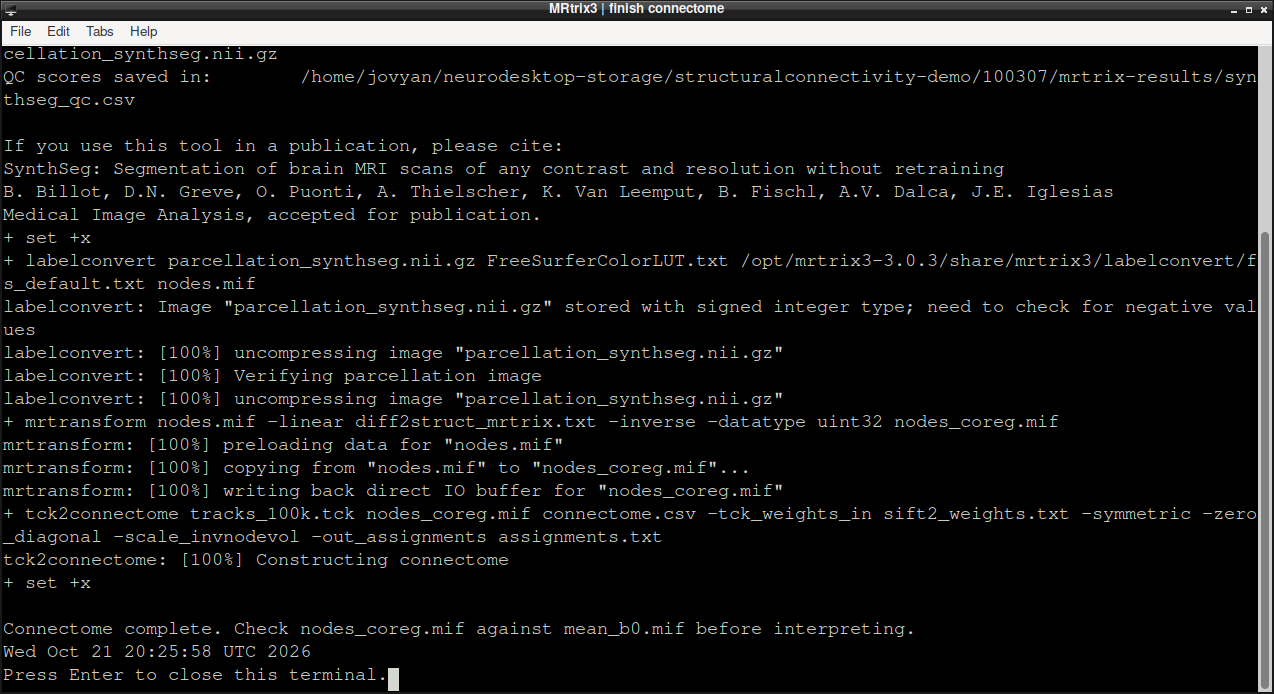
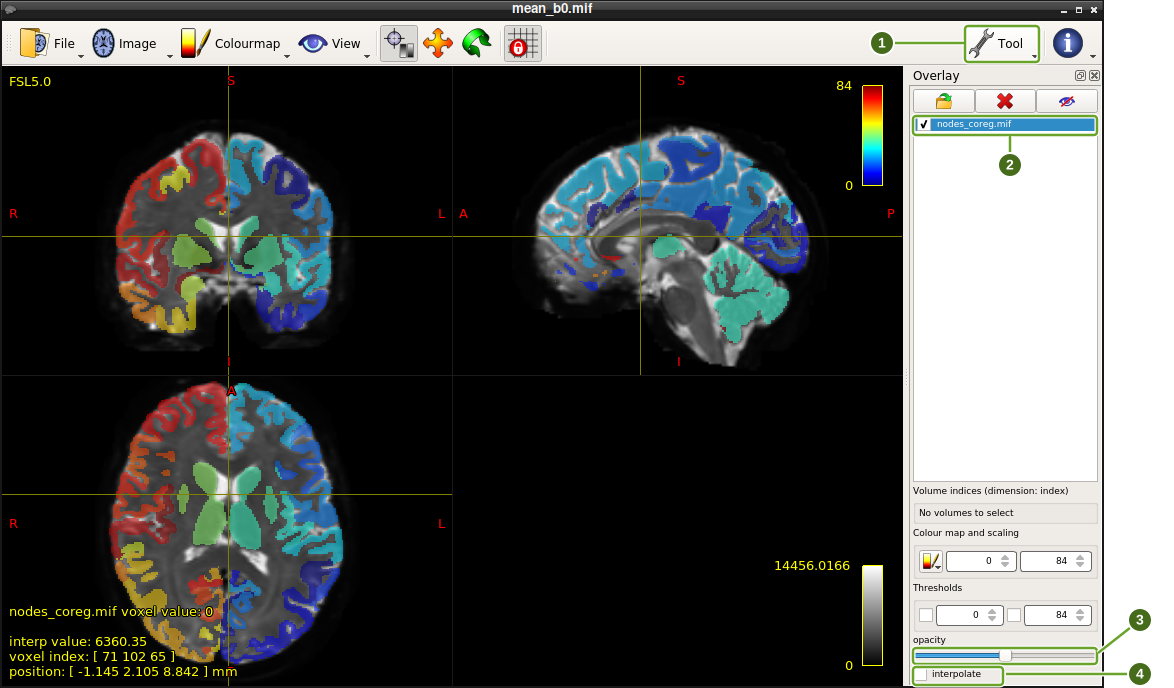
Check image alignment in MRtrix before interpreting the matrix. A parcellation that is shifted or in a different space will produce misleading node assignments. Overlay the transformed node image on the mean b=0 image; each coloured region should sit on the matching grey-matter structure:
mrview mean_b0.mif -mode 2 -overlay.load nodes_coreg.mif \
  -overlay.opacity 0.5 -overlay.colourmap 3 -overlay.interpolation 0
Choose Tool → Overlay (1).
Use the checkbox beside nodes_coreg.mif (2) to compare the labels with the mean b=0 image.
Adjust opacity (3); the screenshot uses 0.5.
Leave Interpolate (4) unchecked so integer labels are displayed without smoothing between regions.
Click a structure in any plane to move all three views to that location. Inspect the cortex and deep grey matter, then close MRview to return to the terminal.
connectome.csv is an 84 × 84 matrix (34 cortical regions per hemisphere plus the subcortical structures in fs_default.txt). Plot it in a Python session opened from the Neurodesktop terminal in mrtrix-results (run python3, then paste the following). The figure opens as a desktop window:
import numpy as np
import matplotlib.pyplot as plt

connectome = np.loadtxt('connectome.csv', delimiter=',')
plt.figure(figsize=(7, 6))
plt.imshow(connectome, cmap='viridis')
plt.colorbar(label='SIFT2 weight / node volume')
plt.title('HCP 100307 SIFT2-weighted connectome')
plt.xlabel('Region')
plt.ylabel('Region')
plt.show()
The same matrix can be opened in MATLAB (ml matlab/2022a, after activating your licence) with readmatrix and imagesc:
connectome = readmatrix('connectome.csv');
imagesc(connectome);
axis square;
colorbar;
title('HCP 100307 SIFT2-weighted connectome');
xlabel('Region');
ylabel('Region');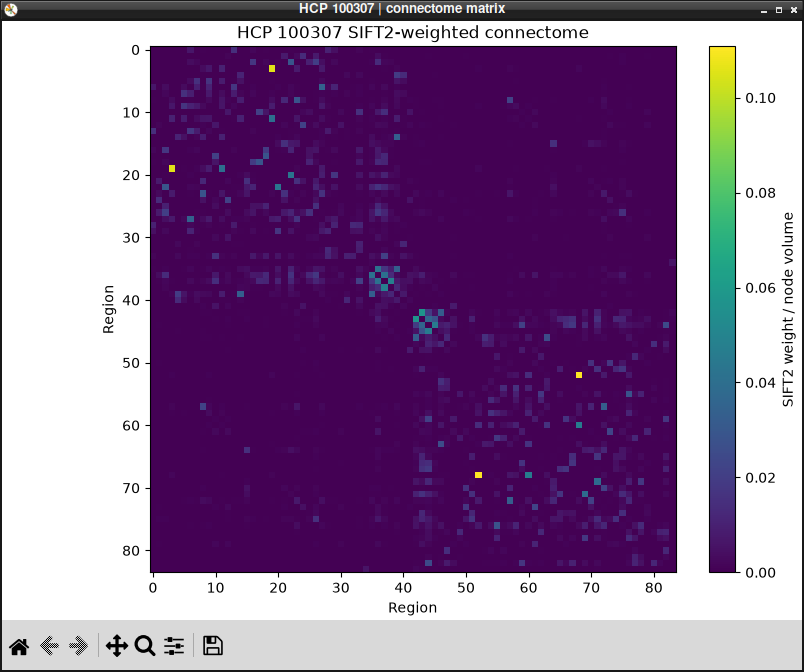
Matrix rows and columns follow the region ordering in fs_default.txt. The diagonal is zero because of -zero_diagonal; the colour scale shows SIFT2 weights scaled by inverse node volume, rather than raw streamline counts. For multi-subject or publication analyses, consult the references and report the complete preprocessing and tractography settings.