Example workflow for the PhysIO Toolbox
This tutorial was created by Lars Kasper.
Github: @mrikasper
Twitter: @mrikasper
Origin
The PhysIO Toolbox implements ideas for robust physiological noise modeling in fMRI, outlined in this paper:
Kasper, L., Bollmann, S., Diaconescu, A.O., Hutton, C., Heinzle, J., Iglesias, S., Hauser, T.U., Sebold, M., Manjaly, Z.-M., Pruessmann, K.P., Stephan, K.E., 2017. The PhysIO Toolbox for Modeling Physiological Noise in fMRI Data. Journal of Neuroscience Methods 276, 56-72. Kasper et al. (2017)
PhysIO is part of the open-source TAPAS Software Package for Translational Neuromodeling and Computational Psychiatry, introduced in the following paper:
Frässle, S., Aponte, E.A., Bollmann, S., Brodersen, K.H., Do, C.T., Harrison, O.K., Harrison, S.J., Heinzle, J., Iglesias, S., Kasper, L., Lomakina, E.I., Mathys, C., Müller-Schrader, M., Pereira, I., Petzschner, F.H., Raman, S., Schöbi, D., Toussaint, B., Weber, L.A., Yao, Y., Stephan, K.E., 2021. TAPAS: an open-source software package for Translational Neuromodeling and Computational Psychiatry. Frontiers in Psychiatry 12, 857. Frässle et al. (2021)
Please cite these works if you use PhysIO and see the FAQ for details.
Neurodesk offers the possibility of running PhysIO without installing MATLAB or requiring a MATLAB license. Debugging and extending the toolbox require the MATLAB version. Current source code is hosted in the PhysIO repository.
More general information about PhysIO is available in the README.
Purpose
The general purpose of the PhysIO toolbox is model-based physiological noise correction of fMRI data using peripheral measures of respiration and cardiac pulsation (respiratory bellows, ECG, pulse oximeter/plethysmograph).
It incorporates noise models of
cardiac/respiratory phase (RETROICOR, Glover et al. 2000), as well as
heart rate variability and respiratory volume per time (cardiac response function, Chang et. al, 2009, respiratory response function, Birn et al. 2006),
and extended motion models (e.g., censoring/scrubbing)
While the toolbox is particularly well integrated with SPM via the Batch Editor GUI, its output text files can be incorporated into any major neuroimaging analysis package for nuisance regression, e.g., within a GLM.
Core design goals for the toolbox were: flexibility, robustness, and quality assurance to enable physiological noise correction for large-scale and multi-center studies.
Some highlights:
Robust automatic preprocessing of peripheral recordings via iterative peak detection, validated in noisy data and patients, and extended processing of respiratory data (Harrison et al., 2021)
Flexible support of peripheral data formats (BIDS, Siemens, Philips, GE, BioPac, HCP, ...) and noise models (RETROICOR, RVHRCOR).
Fully automated noise correction and performance assessment for group studies.
Integration in fMRI pre-processing pipelines as SPM Toolbox (Batch Editor GUI).
The accompanying technical paper about the toolbox concept and methodology can be found at: Kasper et al. (2017)
Download Example Data
This walkthrough uses the official PhysIO examples v9.1.0 archive on Zenodo. This version was tested with Neurodesk’s physio/r2021a container in October 2026.
Open Firefox inside the Neurodesk desktop and visit the archive page.
Under Files, click Download (1). The archive is about 38.5 MB.

Open Downloads in the file manager, right-click the downloaded ZIP and select Extract Here.
Rename the extracted
ComputationalPsychiatry-PhysIO-Examples-9343a40folder tophysio-demoand move it into~/neurodesktop-storage/.Open
physio-demo/Philips/ECG3T/. It should containSCANPHYSLOG.log,rp_fMRI.txtand thephilips_ecg3t_*scripts and batch files.
Copy your own data
On Windows, the folder
C:\neurodesktop-storageshould have been automatically created when starting neurodeskThis is your direct link to the neurodesk environment, and anything you put in there should end up within the neurodesk desktop in
/neurodesktop-storage/and on your desktop understorage
Example: Running PhysIO in the GUI
Start SPM
In the bottom-left Applications menu, select Neurodesk (1) → Functional Imaging (2) → physio (3) → physioGUI r2021a (4).
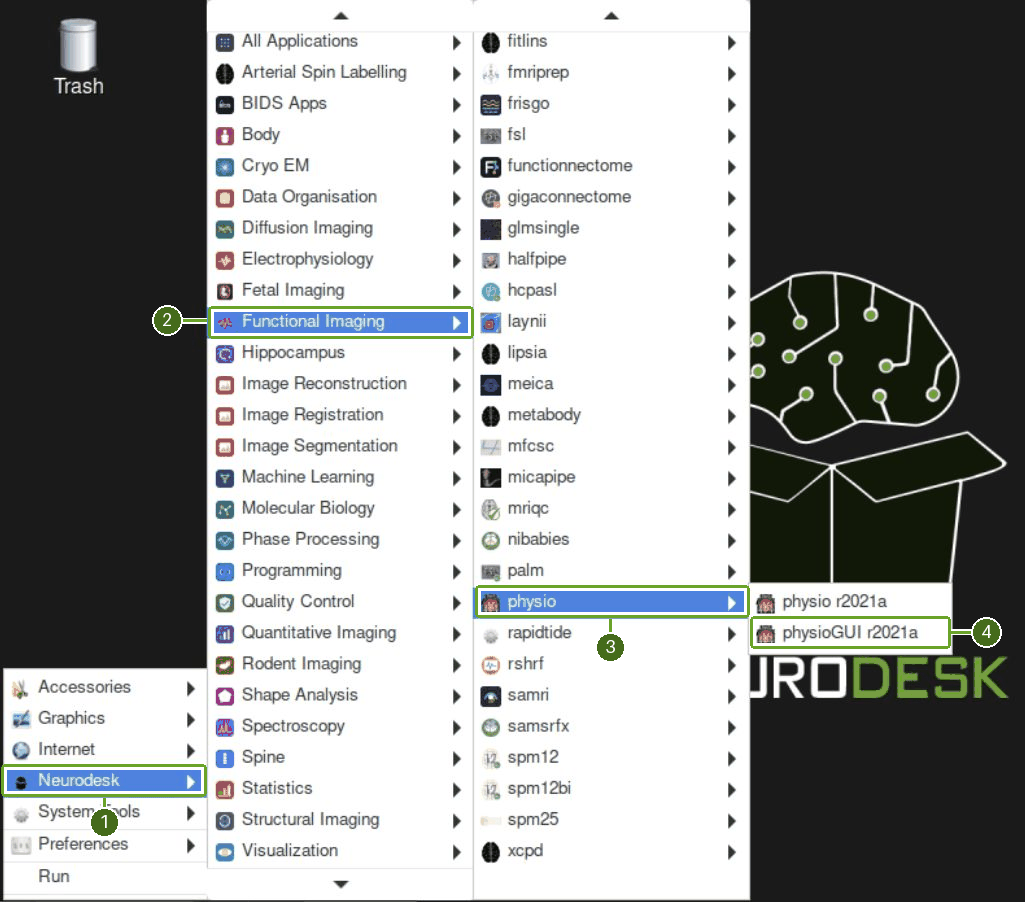
If the menu does not open SPM, open LXTerminal from the desktop panel and enter these two commands, one at a time:
ml physio/r2021a
spm12 fmri
Wait for the SPM windows to appear. This command selects fMRI mode directly. The remaining steps use the SPM GUI.
Select the working directory
In SPM’s main Menu window, open Utils… (1) and choose CD (2).
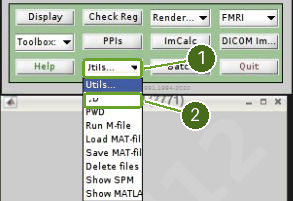
Navigate to
~/neurodesktop-storage/physio-demo/Philips/using the left-hand directory list. In the right-hand list, click ECG3T, then Done. The selected directory appears in the box at the bottom before you click Done.
The batch uses relative input paths, so SPM must be working in the folder containing SCANPHYSLOG.log and rp_fMRI.txt.
Load and run the batch
Click Batch (1) in SPM’s main Menu window.
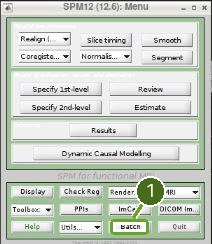
In Batch Editor, choose File → Load Batch, or click the open-folder icon (1 in the next screenshot).
Select
philips_ecg3t_spm_job.m, then Done. Wait for TAPAS PhysIO Toolbox to appear in the Module List. The corresponding.matfile is also supplied; do not selectphilips_ecg3t_matlab_script.m.Leave the example parameters unchanged.
save_dirisphysio_out, a subfolder of the selected working directory.Click the green Play button (2).
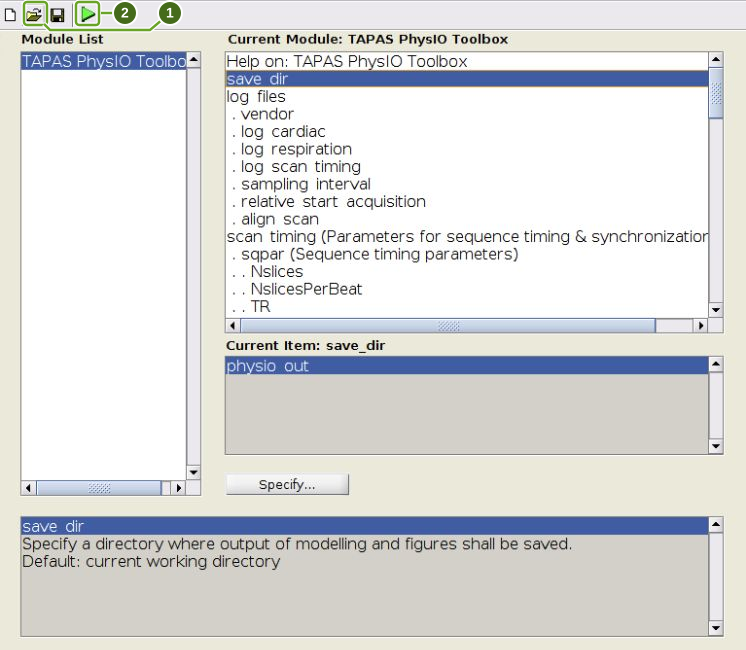
Several quality-control figures open during processing. The final figure is Model: RETROICOR GLM regressors, showing the nuisance regressor matrix. Maximize this figure to see all scan rows and regressor labels.
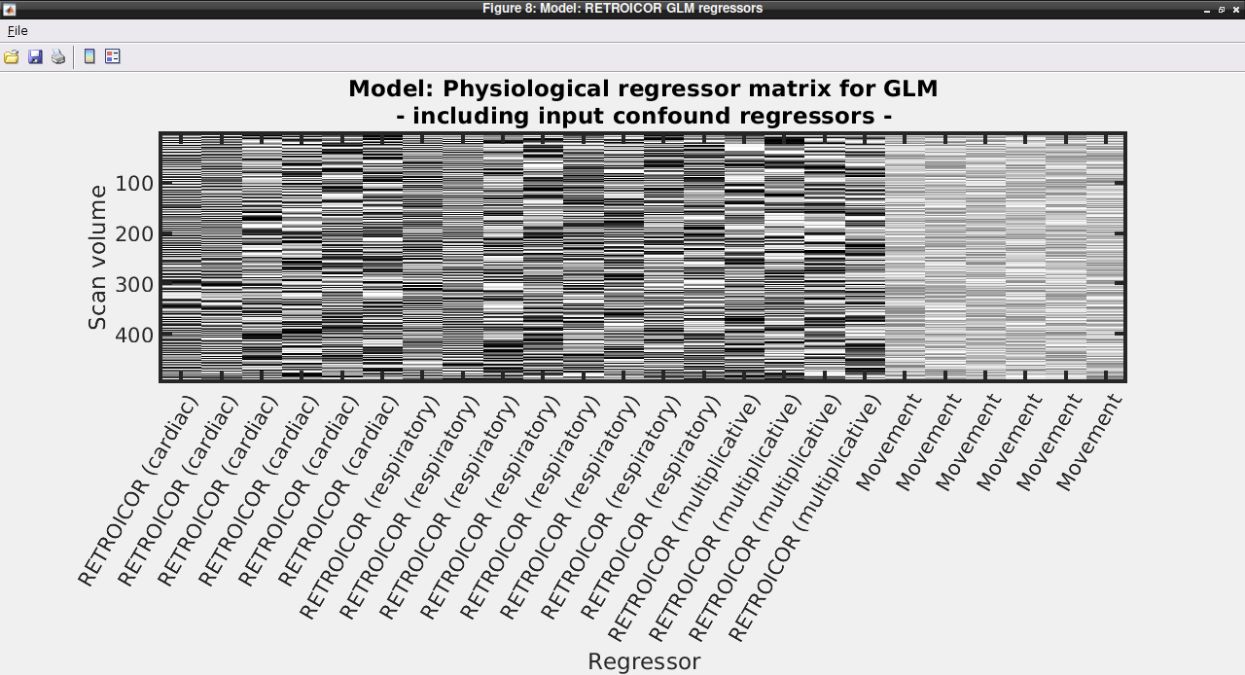
The tested example produced physio_out/multiple_regressors.txt with 495 rows and 24 columns, plus physio.mat and saved quality-control figures. If the final matrix does not appear, check the terminal associated with SPM for errors. For missing input files, check the working directory and the paths under log_files and the movement-regressor settings in Batch Editor.
To create a new batch from scratch, use SPM → Tools → TAPAS PhysIO Toolbox in Batch Editor. Loading the supplied example already creates this module.
Further Info on PhysIO
Please check out the README and FAQ.
- Kasper, L., Bollmann, S., Diaconescu, A. O., Hutton, C., Heinzle, J., Iglesias, S., Hauser, T. U., Sebold, M., Manjaly, Z.-M., Pruessmann, K. P., & Stephan, K. E. (2017). The PhysIO Toolbox for Modeling Physiological Noise in fMRI Data. Journal of Neuroscience Methods, 276, 56–72. 10.1016/j.jneumeth.2016.10.019
- Frässle, S., Aponte, E. A., Bollmann, S., Brodersen, K. H., Do, C. T., Harrison, O. K., Harrison, S. J., Heinzle, J., Iglesias, S., Kasper, L., Lomakina, E. I., Mathys, C., Müller-Schrader, M., Pereira, I., Petzschner, F. H., Raman, S., Schöbi, D., Toussaint, B., Weber, L. A., … Stephan, K. E. (2021). TAPAS: An Open-Source Software Package for Translational Neuromodeling and Computational Psychiatry. Frontiers in Psychiatry, 12. 10.3389/fpsyt.2021.680811